


Attacks Hiding Behind Legitimate Tools: How AhnLab EDR Detects Them
In endpoint attacks, the scale of damage is often determined not by the initial execution of malware, but by the post-exploitation activities that follow. For security teams, it is crucial to have a detection and response framework that provides early visibility into the attack lifecycle and enables root cause through behavioral analysis.
In particular, attacks that abuse legitimate tools are difficult to identify through simple execution checks; thus, an approach that captures anomalous indicators based on behavior is required.
From this perspective, AhnLab EDR detects threat indicators based on suspicious behaviors occurring on endpoints and visualizes the attack flow to support informed response decisions. In this article, we examine how AhnLab EDR detects and visualizes real-world attacks, using recent cases involving the abuse of Remote Monitoring and Management (RMM) tools as examples.

Why EDR-Based Threat Monitoring Is Essential
Recently, attackers have increasingly abused RMM tools—commonly used for legitimate administrative purposes—to remotely control compromised systems or deploy additional malware, thereby expanding their attacks. The challenge lies in the fact that these tools are often used in enterprise environments and, in many cases, classified as legitimate software. As a result, traditional anti-virus–based approaches may struggle to accurately determine malicious intent or respond effectively.
For this reason, organizations must move beyond simply checking whether a specific tool is installed or executed. Instead, they need an EDR-based monitoring framework capable of tracking suspicious behaviors on endpoints, correlating execution context with subsequent attack activity, and analyzing the full attack chain.
AhnLab EDR is a next-generation endpoint detection and response solution that delivers advanced threat monitoring, analysis, and response capabilities, powered by AhnLab’s proprietary behavior-based analysis engine. It continuously collects categorized behavioral data related to suspicious activities and enables security teams to clearly identify threats based on detection results. This allows defenders to conduct comprehensive analysis, determine root causes, and establish effective response and recurrence prevention processes.
The following sections outline representative cases based on confirmed attack flows, illustrating how RMM tools were abused and how AhnLab EDR detected these threat indicators.
Case 1. RMM Installation via Fake Utility Download Pages
In November 2025, attacks abusing the RMM tools LogMeIn Resolve and PDQ Connect were identified. Attackers lured users to fake download pages impersonating legitimate utilities such as Notepad++, 7-Zip, as well as popular services like Telegram, ChatGPT, and OpenAI. Through these pages, victims were tricked into downloading LogMeIn Resolve, after which additional malware with information-stealing capabilities was installed.
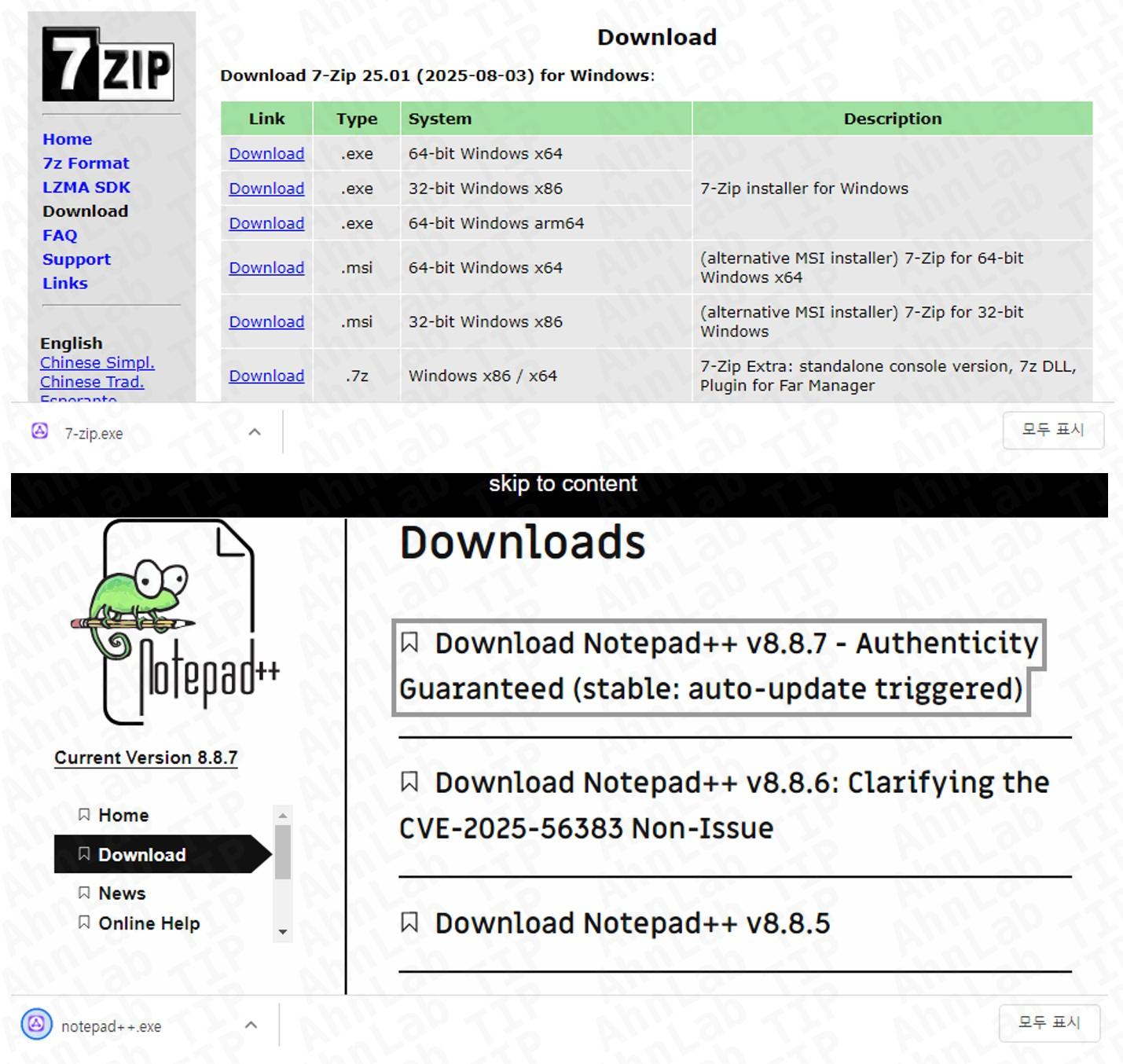
[Figure 1] Fake utility download page
LogMeIn Resolve is an RMM tool that provides remote support, patch management, and monitoring capabilities. Once installed, the system is registered with LogMeIn’s infrastructure, enabling attackers to remotely control the compromised endpoint. In the observed cases, attackers abused LogMeIn Resolve to execute PowerShell commands and install a backdoor malware known as PatoRAT.
PatoRAT was also found to be deployed via PDQ Connect, another RMM tool offering software package deployment, patch management, inventory management, and remote-control features. Analysis indicates that attackers induced users to install PDQ Connect and then abused it in the same manner as LogMeIn Resolve to deploy PatoRAT.
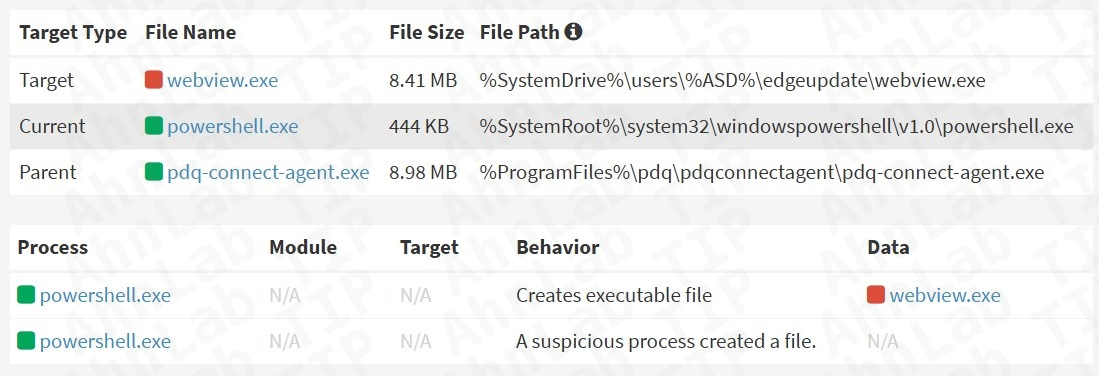
[Figure 2] Malware installation log using PDQ Connect
AhnLab EDR detects the execution of LogMeIn Resolve and PDQ Connect on endpoints as suspicious activity, enabling administrators to identify and respond to these anomalies at an early stage.
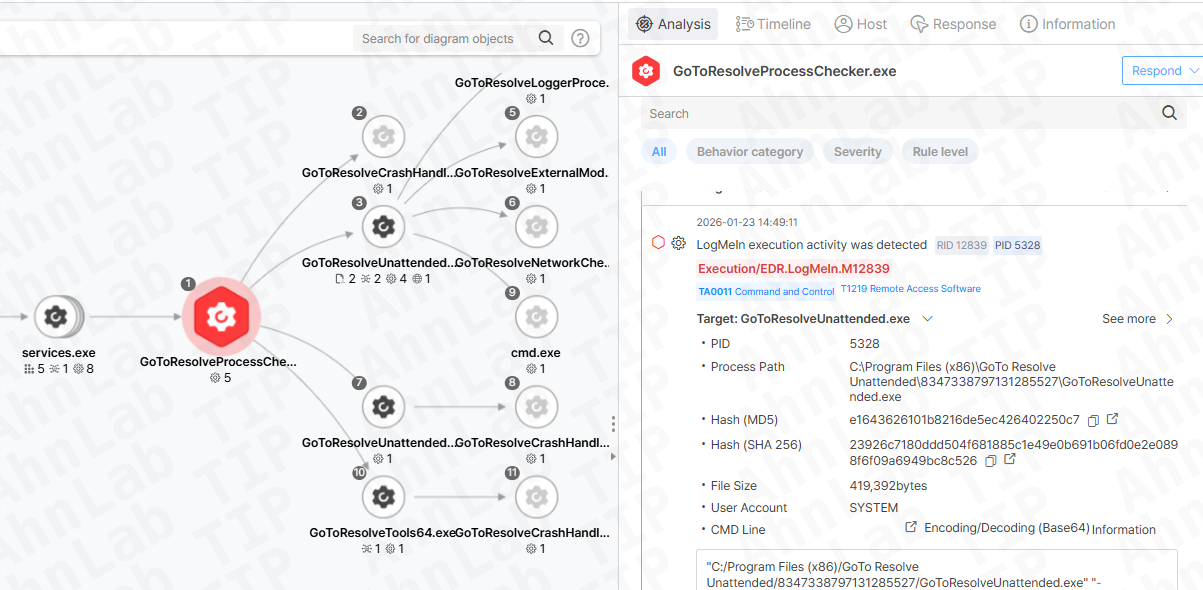
[Figure 3] Detection of LogMeIn execution using AhnLab EDR
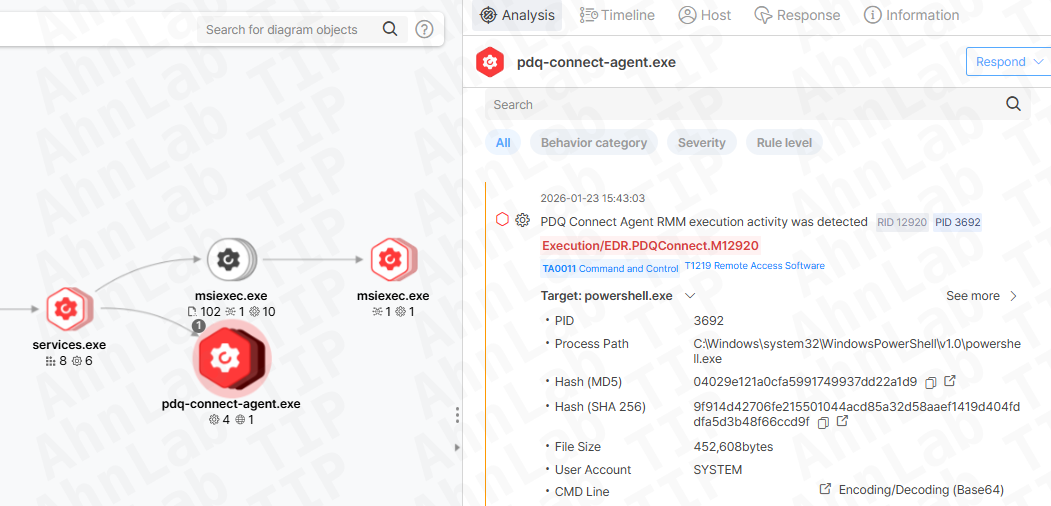
[Figure 4] Detection of PDQ Connect execution using AhnLab EDR
Case 2. Phishing Emails Disguised as Legitimate PDF Documents Distributing RMM Tools
In January 2026, another campaign was identified in which phishing emails were used to distribute various RMM tools, including Syncro, SuperOps, NinjaOne, and ScreenConnect. The malicious PDF attachments were disguised with business-related filenames containing keywords such as “Invoice,” “Product Order,” and “Payment” to lower suspicion. When opened, the document displayed a message claiming that preview was unavailable due to high resolution and prompted users to click a Google Drive link.
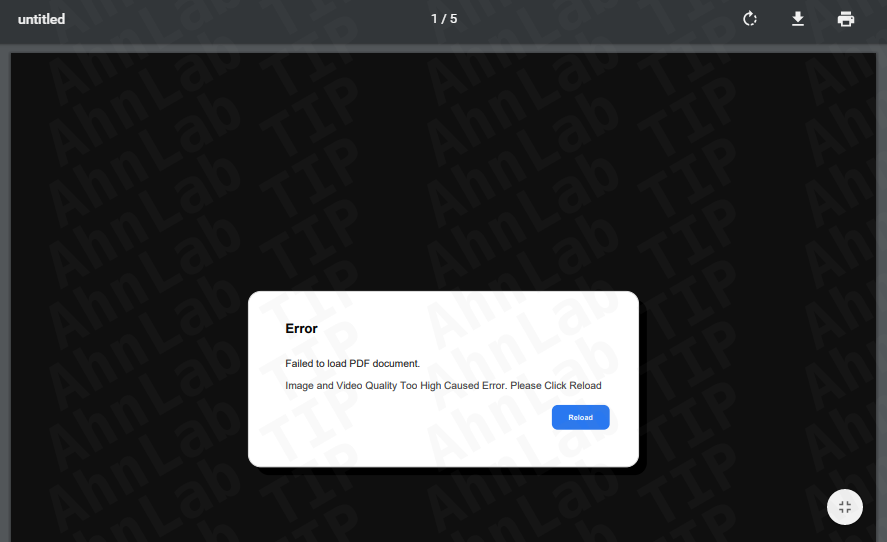
[Figure 5] Malicious PDF document used in the attack
The RMM tool distributed through this attack was confirmed to be Syncro. Syncro RMM is a remote monitoring and management platform designed for Managed Service Providers (MSPs) and IT teams. It is known to have been used not only by ransomware groups such as Chaos and Royal, but also by the Iranian APT group MuddyWater.

[Figure 6] Syncro official website
Further analysis of malware signed with the same digital certificate revealed that multiple RMM tools had been abused since October 2025. ScreenConnect, an RMM and remote support solution providing remote access and screen control, is commonly used for troubleshooting and maintenance, but has also been reported in attacks by ransomware groups such as ALPHV/BlackCat and Hive.
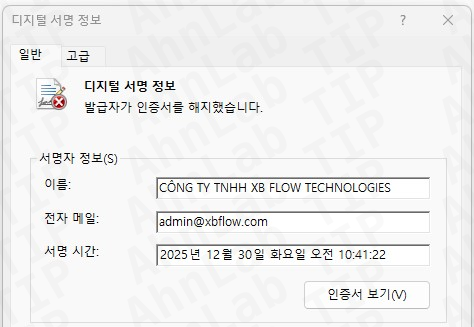
[Figure 7] Certificate used to sign the malware
In addition, NinjaOne and SuperOps were also observed being abused. NinjaOne is a cloud-based RMM solution designed to remotely monitor and manage enterprise IT infrastructure, offering features such as remote access, patch and software deployment, performance monitoring, and IT asset management. SuperOps is a cloud-based RMM/PSA integrated solution for MSPs, providing similar capabilities including remote access, asset and patch management, and monitoring.
AhnLab EDR detects the execution indicators of these RMM tools as threats, enabling administrators to proactively recognize and respond to suspicious activity.
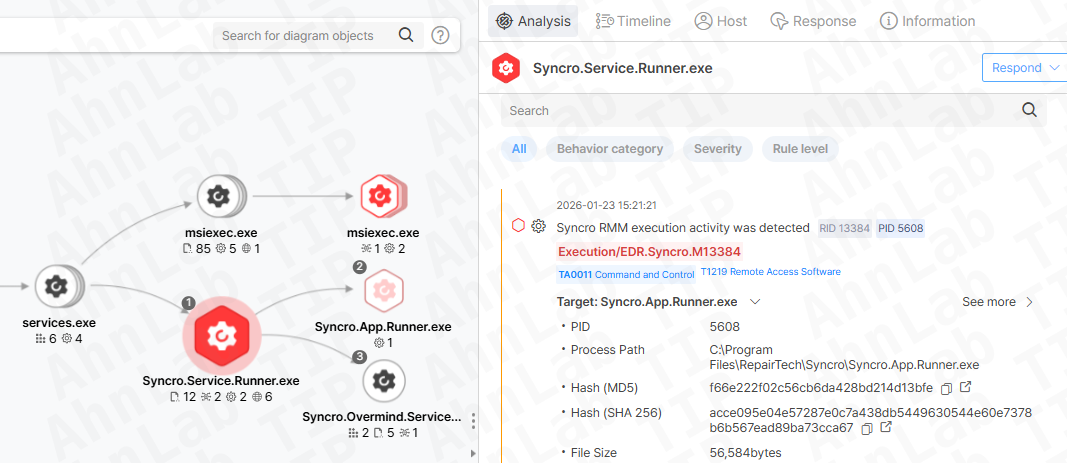
[Figure 8] Detection of Syncro execution using AhnLab EDR
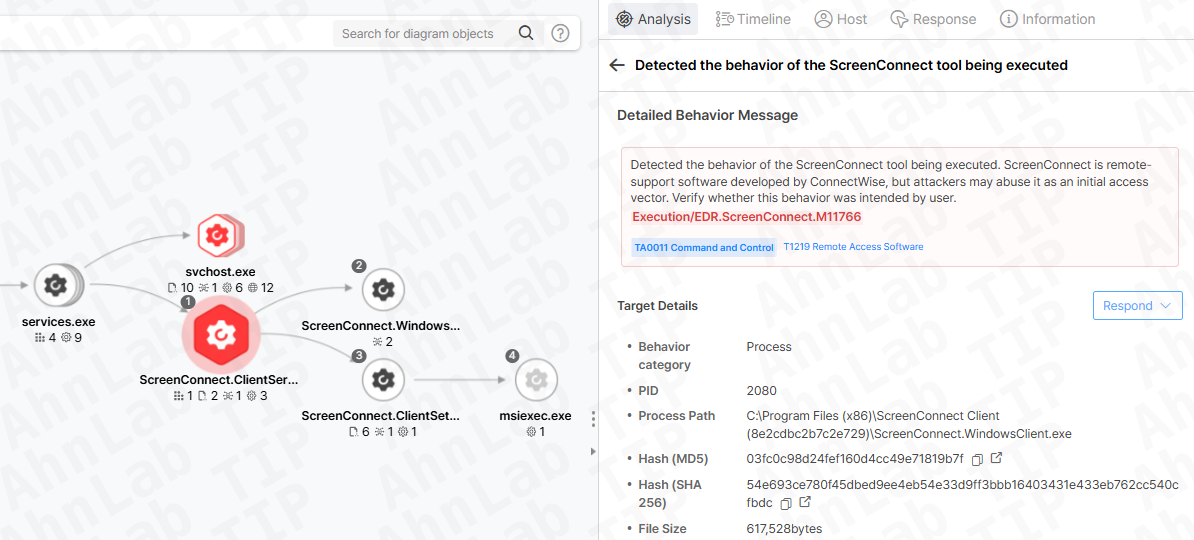
[Figure 9] Detection of ScreenConnect execution using AhnLab EDR
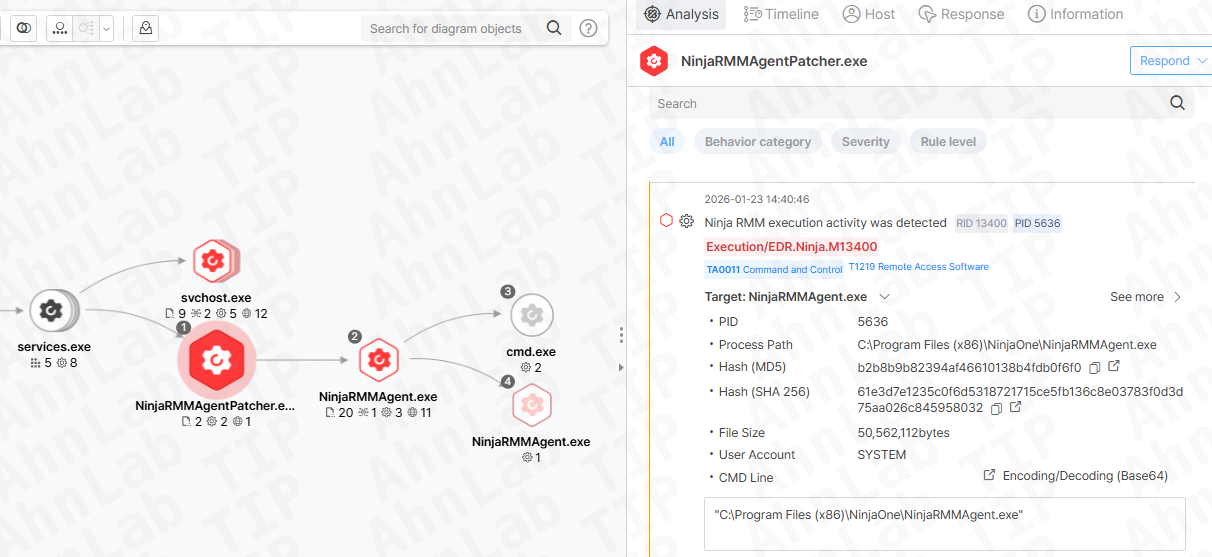
[Figure 10] Detection of NinjaOne execution using AhnLab EDR
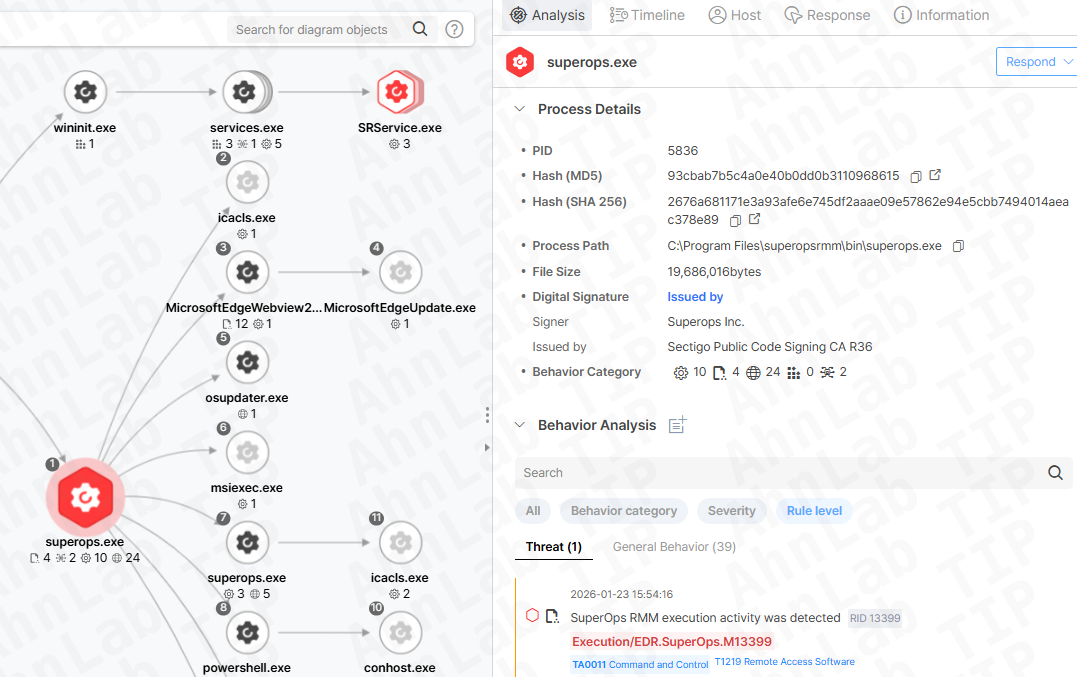
[Figure 11] Detection of SuperOps execution using AhnLab EDR
Conclusion
As demonstrated, attack techniques abusing legitimate RMM tools continue to evolve in both scale and sophistication. To significantly reduce the risk of compromise, organizations should consistently enforce the following four security best practices:
1. Verify official sources before downloading utilities
- Always confirm that downloads originate from official websites.
- Be cautious of sponsored ads or top search results, as they may lead to spoofed pages.
2. Check version information and digital certificates of downloaded files
- Verify file version details and digital signatures to ensure the installer is legitimate.
3. Inspect suspicious emails before opening
- Confirm the credibility of the sender and avoid opening suspicious links or attachments.
4. Keep operating systems and security solutions up to date
- Regularly update operating systems and security products to protect against known threats.
More detailed information about AhnLab EDR is available on the AhnLab website.
- AhnLab