


To Break or to be Broken by the Ill-fated Cycle of SMB Vulnerability Attacks
SMB vulnerability has been widely exploited by numerous threat groups since early 2017. Examples include WannaCry(2017), PETYA(2017), Bad Rabbit ransomware(2017), GandCrab ransomware variants(2018), WannaMine CoinMiner(2019), and CLOP ransomware(2019). Due to the appearance of the CLOP ransomware in 2019, AD servers and SMB vulnerability became, yet again, a hot issue globally. Malware exploiting SMB vulnerabilities always finds a way to haunt us every year. Security patch for SMB vulnerability is available, but why are we still being attacked, and is there any solution? Let’s deep dive into the chronicles of SMB vulnerability.

SMB vulnerability was first brought to attention when WannaCry (or WannaCryptor) ransomware made its appearance in May, 2017. WannaCry ransomware locked up more than 300,000 systems in 150 countries. Then, what exactly is SMB, and how can it contribute to such attacks?
SMB stands for “Server Message Block,” which is a Windows protocol designed to allow resources to be shared between different nodes on a network. It is used by several computers in the same network to share files, printers, ports, or other messages. The SMB protocol enables easy sharing of resources between devices running on different Operating Systems and allows for direct modification of data on a browser without additional client when sharing files with Linux devices via NAS or network scanners.
Such excellent compatibility kept the SMB protocol popular in the industry for a long time, but at the same time, its vulnerability has made it an easy target for the attackers. Examples include the WannaCry, or WannaCryptor ransomware from years back. However, the chronicles of malware exploiting the SMB vulnerability goes way back, approximately ten years.
SMB vulnerability (MS08-067) first sees light through Conficker
Conficker, which was widely distributed in late 2008, infecting over 6.5 million computers worldwide, is a worm virus that spreads via the vulnerability of a Windows Server service, Remote Code Execution. Conficker spreads mainly via the Windows security vulnerability (MS08-067), admin shared folders (IPC$, ADMIN$), and removable drives. When the Conficker infects a system with the MS08-067 vulnerability, the infection spreads to other connected systems, generating a massive traffic on a random IP range or the B-class IP range over the remote TCP port 445.
However, SMB vulnerability was soon forgotten as Conficker was addressed, and many went on using their systems without applying the recent security patch.
WannaCry brings up SMB vulnerability (MS17-010)
Approximately 6 years had passed since Conficker when WannaCry ransomware made an entrance exploiting the same SMB vulnerability (MS17-010). Unlike most common ransomware causing infections via email attachments or altered websites, WannaCry ransomware spread via the SMB Remote Code Execution vulnerability (MS17-010).
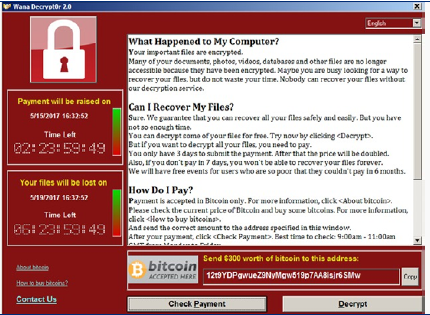
Figure 1. Ransom note of the WannaCry ransomware
The impact of WannaCry ransomware was undisputable in 2017. Even Microsoft realized the significance of the crisis and released an emergency security patch even for discontinued OS, such as Windows XP and Windows Server 2003.
One good thing about the WannaCry crisis was that it reminded users the importance of security patches. Many companies became interested in security patch management solutions, adopted new solutions, and strengthened existing ones. Many thought that SMB vulnerability was solved for good. Or so we thought….
WannaMine sheds light on SMB vulnerability (MS17-010) once again
Exactly about a year after the crisis with WannaCry ransomware, a crypto-mining malware, also known as the CoinMiner shed light on MS17-010 vulnerability.
As the amount of CoinMiner increased, the method of distribution became diverse, and a new CoinMiner called the WannaMine appeared. WannaMine is a file-less malware that exploits the SMB vulnerability, mines cryptocurrency on the infected systems, and simultaneously downloads a malware called “EternalBlue” from the attacker’s server. This CoinMiner was named “WannaMine” because it used the same tool as WannaCry to exploit the SMB vulnerability.
WannaMine malware quickly became an issue when there were cases of it being distributed with CLOP ransomware, which was widely spread early this year. Besides exploiting the SMB vulnerability, WannaMine malware also used WMI and ADMIN$ shared folders to accelerate internal infection.
How to pinpoint SMB vulnerability once and for all
The importance of security patch cannot be emphasized enough when it comes to using the SMB protocol safely. SMB protocol supports the easy transfer of resources between various operating systems. A Patch Management Solution (PMS) is required to ensure that all devices have security patch installed and appropriate measures have been made, if not already patched. If PMS is not available at the moment or in the near future, it is important to figure out an alternative security solution to deal with the vulnerability left out in the ocean of attackers to exploit.
AhnLab has a variety of security solutions to armor against SMB vulnerability. Each organization should take into consideration their current security status as well as the solutions that they are currently using when planning out their next step. Followings are the solutions that AhnLab offers to help organizations along this process.
1. Unified console platform-based defense against SMB vulnerability
AhnLab Patch Management (APM) is AhnLab Endpoint Protection Platform (EPP)-based solution that helps you manage the MS17-010 patch status within the organization to take appropriate measures. A security administrator can click the number displayed in the “Not applied” column in the “Management > Patch status” menu to be directed to the agent list and send a command to execute the patch. For security rollup patches, a cumulative patch provides the previous month’s security rollup patch along with this month’s. Therefore, the MS17-010 security patch is automatically applied when you install a security rollup patch released after March 2017.
While APM automatically applies the latest security rollup patches, AhnLab EPP provides integrated rules to allow you to proactively take measures based on each organization’s security environment and the pre-defined conditions.
2. Detect and respond to advanced threat using AhnLab MDS via C&C traffic anomaly
AhnLab MDS is an advanced threat defense solution that shields against APTs. It detects unknown SMB vulnerability attacks and takes appropriate measures accordingly. AhnLab MDS monitors the network status for traffic anomaly to detect communications to and from specific IPs via port 445, and prevents the spread of internal infections through traffic mirroring.
3. Detect and respond to the SMB vulnerability attacks utilizing V3
V3, AhnLab's anti-malware, provides ‘Intrusion Prevention Systems(IPS)’ feature to detect malware, such as worm or Trojan, and blocks them from entering the system. AhnLab endlessly analyzes the latest threats and updates V3’s IPS detection rules accordingly. Security managers can take advantage of the most recent IPS detection rules to isolate the threat and prevent the spread of the infection within the same network.
4. Secure seamless OT environment with AhnLab EPS
Conficker worm, which has been around for the last decade, has been targeting industrial systems within the Operational Technology (OT) environment, such as ICS systems or POS terminals, rather than PCs. AhnLab EPS, identifies and blocks the Conficker worm from exploiting the MS08-067 vulnerability, prevents internal transfer of the virus, and even detects the hosts. By monitoring the inbound and outbound log, AhnLab EPS identifies the host IP and infected nodes. The inbound log reveals the infected system which attempts to attack other systems, and the outbound log reveals the systems on the same network that are being attacked.
5. Countermeasure without adopting an additional Patch Management System (PMS)
SMB vulnerability patches are possible without an additional PMS or AhnLab security solution. All you have to do is to enable regular “Windows automatic updates” to perform updates or download related security patches from the Microsoft website.
If your environment does not allow SMB vulnerability-related patches, you can configure the firewall to block the SMB port and disable the SMB protocol in the OS settings. If the Remote Desktop Protocol (RDP) is in use, you should change the default port number and the IP access controller.
Finding the way from Art of War against repeated SMB vulnerability attacks
In the Art of War, Sun Tzu said, “The supreme art of war is to subdue the enemy without fighting.” Then he also said, “If you know the enemy and know yourself, you need not fear the result of a hundred battles.” Instead of trying to fight against the adversary who exploits SMB vulnerability, we can continue to advance our security by reviewing the status of security patch applications and keep the systems updated. Let us not repeat the same mistake of losing the battles even when we know the problem and the solutions to that problem.


