New Phishing Attack Targets Microsoft Users
A new type of phishing attack targeting Microsoft (MS) users has been discovered. Microsoft is one of the world's biggest software providers. MS accounts are used not only by home users, but also by enterprise product users, such as IT managers responsible for managing software licenses or distributing update patches to their organizations.
The phishing site mimicked Microsoft’s sign-in page. It was designed with such detail that it is almost impossible to tell it apart from the real page, as shown in Figure 1. In fact, this phishing site refers to previously generated files from the pages referenced by the real website.
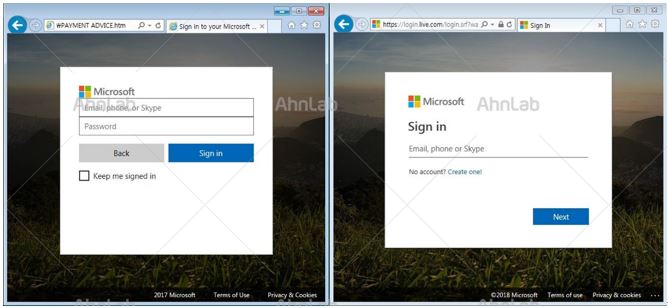
[Figure 1] Phishing Website (Left), Real MS Website (Right)
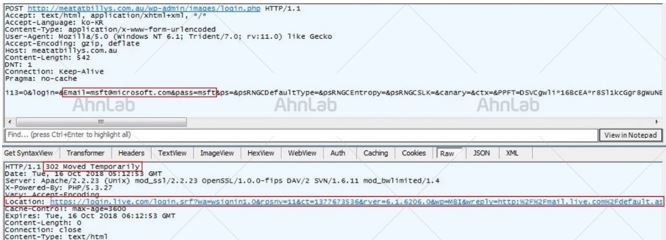
This can be shown in their codes. The phishing page’s code (Top of Figure 2) shows that the specified URL is based on a file that was previously generated by the actual MS sign-in page (Bottom of Figure 2). However, the URL in the code of the real MS page was updated in August 2018, while the URL in the phishing page’s code was updated in March 2017.

[Figure 2] Phishing Page Code (Top), Real MS Page Code (Bottom)
If a user accesses the phishing website, enters their MS credentials, and clicks the Sign In button, their information is sent to the phishing site and the user is redirected to the real MS sign-in page. The information sent includes the login information, URL, and the normal page information.
AhnLab's anti-malware solution AhnLab V3 provide a feature that blocks phishing websites. The aliases identified by V3 are as below:
<V3 Product Alias>
HTML/Phishing
Most phishing attacks try to steal financial information or login credentials and use seemingly legitimate emails as the means of communication. Similarly, attacks that use phishing websites almost identical to the real websites are extremely difficult for users to detect.
This attack also coincided with the release of a major update to Windows 10 in October 2018. The timing of the attack means that there could be more damage to companies or individual users who do not conduct regular, automatic updates due to various reasons, such as security policies.
Users should be very careful, as stolen credentials for a Web service or email account could lead to secondary or tertiary damage. In particular, for business, it can create the potential for advanced persistent threats and targeted attacks.
There are in fact many phishing attacks targeting the employees of a company. The phishing emails used in such attacks are disguised as business-related emails or as emails from trusted companies. These emails also try to get a response from the recipient by using email titles like "Not enough storage for your email" or "Account blocked."
Moreover, these activities are not identified as abnormal activities by general security solutions because the attacks use legitimate programs installed in the target to collect login credentials. Therefore, users must be on the alert against any phishing attempts in order to prevent advanced phishing attacks.
One way to prevent attacks is by checking the website address in the address bar of the Web browser to make sure the address for the website is correct. Users should suspect a possible attack if their credentials are entered correctly but another sign-in page appears without a login failure message.


