


Top 4 Security Threats for the 1st Half of 2015
They’re Back: The Classics Return, with a Twist.
The malware threat for the first half of 2015 can be summed up as a revisit to the malware of yesteryear. "There is nothing new under the sun," as the saying goes, and indeed the malware that are currently in the spotlight consist of older threats with slightly new operational methodologies. Even known malware, however, take on brand new attack profiles when even slight changes are made, and defending against them is not easy. These malware include ransomware, Upatre that use email spam, SCR (screensaver) malware, and macros.
AhnLab has examined cases of attacks involving the main malware threats of the first half of 2015 and ways to prevent them.
Ransomware strikes fear across the world
Obviously ransomware would be the people's most pick as most notorious malware of the first half of this year. Ransomware became widely known in 2013, but its origins can be traced further back. Unlike in the United States or Europe, ransomware had not been a major threat in Korea until recently. However, reports of PC infections by ransomware began surfacing late last year in Korea, and actual damages have recently been reported by several businesses and organizations.
The dangers of ransomware surfaced in April when CryptoLocker was distributed via a Korean online community. Unlike most ransomware which is in English, CryptoLocker appeared in Korean indicating that the malware had evolved according to local conditions.
Ransomware generally work by encrypting files such as documents and video files stored on the victim's PC, and demands money (the "ransom") in return for decrypting the files. The CryptoLocker discovered in Korea also demanded approximately 438,900 KRW in bitcoins in return for releasing the files. The malware provides a detailed explanation of the steps the victim needs to take in order to easily pay the ransom, and restores one file to show that files can indeed be decrypted. The developer of the malware uses this method to encrypt important files on the targeted user's system and coerces them into making the payment.
Recently, new strains of ransomware are continuously coming, which sends worldwide internet users into a panic. One of the latest ransomware has a function to launch a DDoS (distributed denial of service) attack that causes excessive traffic that paralyzes a web site. Ransomware are also feared because even if the ransom is paid, the infected files are rarely restored. Attacks are becoming increasing intricate with new ransomware targeting mobile devices or gamers, requiring extra vigilance by users.
Prevention is a key in dealing with this kind of ransomware threat. Spammed email is the most common infection pathway for recently reported ransomware. Any email or email attachment from an uncertain source or with a spammed-look message should not be opened and should be deleted. Important or confidential documents should be backed up considering the user's OS, and the backed up files should be stored offsite to ensure maximum safety.
Setting important documents as "read-only" is another good way for prevention. Most types of ransomware try to encrypt the target file by modifying it; setting files as read-only after working with them can prevent ransomware from changing (encrypting) the file. In other words, important documents can be safely stored as read-only and can be modified out of read-only. Basic security guidelines such as installing Anti-virus software and applying the latest OS security updates are also crucial.
Spammed email-borne Upatre malware raging
As noted above, spammed email messages serve as the most effective carrier agent for malware around the world.
Malware infections through email spam mostly uses malicious link in the message or malicious file in the attachment. Attackers trick users into clicking a link in the message and downloading malware to the system. Malicious files also can be downloaded and infect systems disguising as a document or another innocuous file in the attachment.
In Korea, email spam with Upatre malware attachments have been extensively circulated from late last year to the first half of this year. Incidents of Upatre infections have continued to rise around the world since bursting out onto the global malware scene around August of 2013.
Many variations of Upatre malware exist, but some common features include: self-duplication once the attachment in the spammed message (initial fie) is executed; attempt to connect to a C&C server and download additional malware; displaying a normal PDF file to disguise itself as a normal file; and maintaining a communication link to the C&C server and extracting information from the victim.
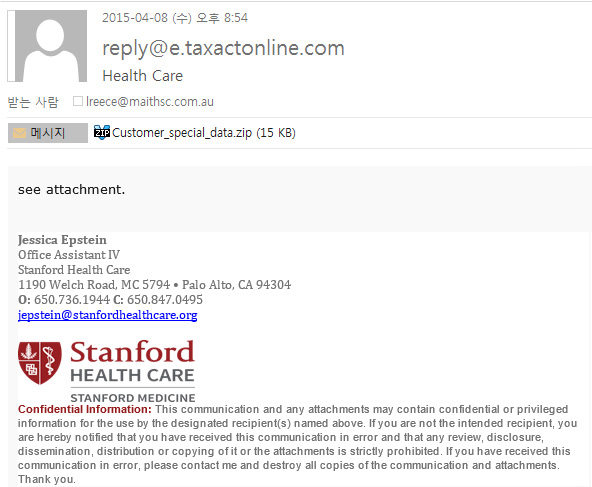
Email spam that contains a Upatre malware will use keywords such as "doc", "document", "invoice", "ticket", "photo" etc. to trick the user into opening the email.
A Upatre variant recently collected by AhnLab was sent out bearing the title "invoice". The message contained an executable file named "invoice1212.exe" and disguised with a PDF file format icon, as shown in [Figure 2].
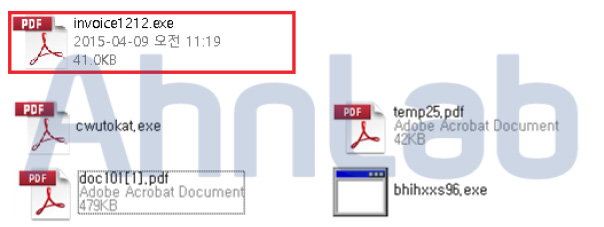
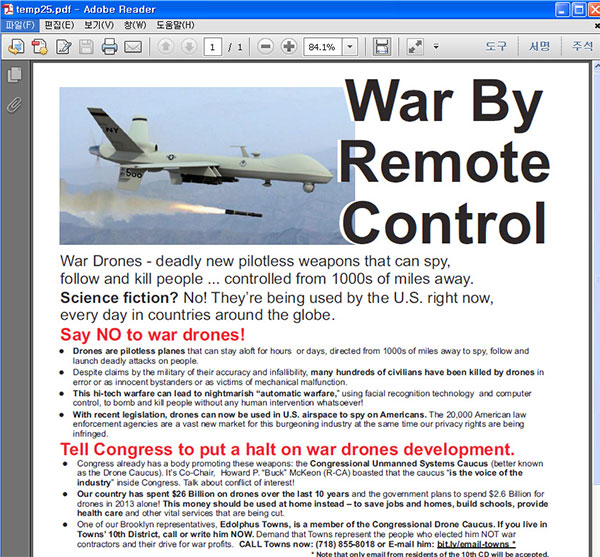
Running the malware attachment "invoice1212.exe" creates additional files and attempts to make a connection to the C&C server to download additional malicious files. The malware will run and display a normal (dummy) PDF file, as shown in [Figure 3], to hide the infection from the user. Most of these types of malware contain Infostealer that extract financial information and other important data.
Upatre variants are being constantly discovered. To prevent an infection by one of these agents, the user should carefully examine an email message for any of the bait words commonly found in spammed email as listed above. Filtering messages with these words through the email security solution is another good method, and users should avoid opening email messages from suspicious sources.
Malware disguised as screensavers (SCRs) continue to evolve
Most PC users are not familiar with the "SCR" file extension, which denotes a screensaver file. To most users, a screensaver shows a variety of images or text to protect the display screen when there is no input from the keyboard or mouse for a certain period of time. Caution should be exercised, however, since SCR files can be used as malware.
AhnLab has confirmed a string of cases involving SCR malware from last year to the first half of this year appearing in Korea. Both the names of these files as well as the images that are output when executed vary widely, from greeting cards for Mid-Autumn festival and New Year’s Day and invitations letters, to photographs of models, political articles about Kim Jeong-eun's absence during a meeting of North Korea's Supreme People's Assembly, sets of statistics, and even purported surveys about the public's awareness of national security issues.
These files have two distinguishing features. First, they display a picture-format icon, and running the file will display an advertisement, a screen-capture of a document, or other image files. The malware creates PE files in a pre-set path on C drive, and extracts user information.
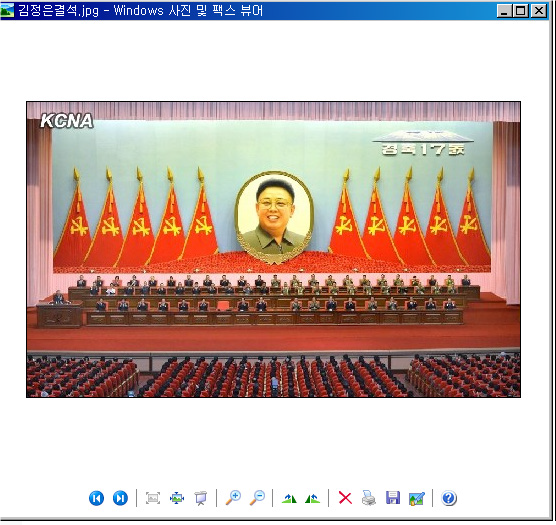
Vital user information can be stolen if these files find their way to government agencies or businesses. These types of malware are also being continuously discovered, requiring extra caution.
Macro viruses back from the dead
"Macro" malware first appeared in 1995 to strike users of the Office suite of applications, only to disappear almost completely in early 2000. Incredibly, the number of incidents involving macro malware began to increase again from 2014, nearly 20 years after their first appearance, and this year new macro malware are being discovered almost daily.
The reappearance of macro malware was even reported in the media in March of 2015.
The number of macro malware registered by AhnLab from customers from 2012 to May of 2015 total 567, among which 387 were found this year up to May, or 108 more than the total number of macro malware found during all of 2014.
The attacker sends emails disguised as résumés, invoices or other documents to trick the victim into opening the attachment. None have been found written in Korean to date and most are in English, although some composed in various European languages have been spotted. Office disables macros by default. However, recent macro malware dupe the victim into enabling the macro feature through so-called "social engineering". The most common method is to present an indecipherable file and tell the victim to enable macros in order to view it. Turning on the macro function may activate the malware without any onscreen changes. Some types of malware, however, usually in the form of Excel files, will trick the user with a different output.
The attacker uses the macro malware to download or activate other malware. Ultimately, the malware that infects the victim's computer extracts user information, steals financial information, and takes remote control of the system.
With incidents of macro malware on the rise again worldwide, caution should be exercised when opening attachments in macro emails; most importantly, the macro function of Office should be kept disabled.


