


You are Invited to a Video Conference Call! by a Malware
AhnLab recently warned its users of malicious malware distributed via emails disguised as video conferencing call invitations.

The sender (attacker) pretends to be a Japanese cosmetics company inviting the victim for a video conference call. Within the email, there is an encrypted archive file attachment. The email body includes ‘日時 (translated: Date),’ ‘添付ファイル名 (translated: Name of the attachment file)’ and ‘パスワード (translated: Password for file decompression)’ to convince the user that the email is indeed normal and trustworthy.
When targeting Korean users, the attacker localizes part of the email in Korean to avoid any suspicion, as shown in Figure 1.
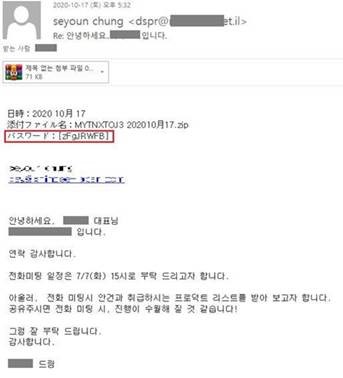
Figure 1. Email content used to distribute malware
When the user downloads the attached file and enters the password to extract the archive file, a malicious document file named ‘MYTNXTOJ3 202010月17.doc’ is automaticallhy executed. The document file prompts the user to press the ‘Enable Editing’ or ‘Use Content’ button by claiming that the ‘program update is required to view the file.’ Upon pressing the ‘Enable Editing’ or ‘Use Content’ button, the user’s PC will be infected with the malware, as shown in Figure 2.
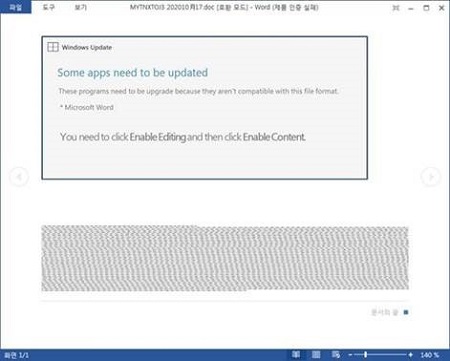
Figure 2. Document file that includes the malware
After infecting the target PC, the malware proceeds to download additional malicious files, such as banking malware to steal internet banking information.
Soojin Choi, Chief Researcher of ASEC (AhnLab Security Emergency-response Center) analysis team, stated, “The attacker attempted to distribute the malware using the recent trend and interest in video conferences.” She also added that “Online conference meetings are becoming more important as COVID-19 has brought along a non-contact, work-from-home culture. Thus, users must be extremely cautious not to open email attachments from unknown sources to prevent all damages.”
AhnLab’s anti-malware product, AhnLab V3, detects these types of malware.
To prevent any damages caused by this malware, users must follow the following security advisories: ▲Do not download suspicious attachment files or open suspicious URL from unknown senders ▲Update your existing anti-malware software to the latest version and run real-time scans ▲Scan the file with the anti-malware software before executing the file ▲Install the latest security update for OS, Internet browser (IE, Chrome, Firefox) and Office software.


