


How to Avoid Ransomware Attacks
Analysis of the Latest Ransomware and Reponses by AhnLab MDS
Ransomware, a variant of malware that prevents or limits access to systems from authenticated users. One known approach for attackers of ransomware is to encrypt and take control of the system data while demanding payment. The issue with ransomware is highly prominent and has affected some of the world’s best and high-profile systems. This report analyzes this latest destructive type of malware, shares preventive measures against them and examine how to respond to attacks using the advanced technology of AhnLab MDS (Malware Defense System).
Ransomware: Virtual Kidnapping
The execution of Ransomware is easily equated to a “virtual kidnapping” of systems. Just like malware, ransomware is another portmanteau, two words blended from "ransom" and "software". Ransomware’s characteristics involve malicious software that “hijacks” the system-authenticated credentials from the information and extorting a ransom payment.
It is known that ransomware have been around for several years. Nevertheless, new victims like large global enterprise and prominent government agencies are falling prey to these attacks. Reports have also shown that the attacks are becoming more sophisticated and targeted, especially those targeted at mobile devices and the gamers’ community.
AhnLab tracks one of the most common methods for ransomware distribution, and that is by sending out a spammed email and trick the user into clicking an attachment. It is a fact that the natural response for any one receiving an email is to click open or execute an attachment. Attackers even go to the extent of invoking catalyst keywords to ensure that the percentage of the execution is even higher.
The method of ransomware distribution is not limited to email spamming; files, photos, movies downloaded from known websites or popular social media platforms are also recognized as a distribution path of ransomware.
One scenario of an attack is that an email recipient clicks the file attached in the email, a message pop-ups on the display screen notifying the end user device (eg. personal computer) is a victim of ransomware. At the same time, the files in the personal computer of the victim, for example documents, digital photos, videos are being encrypted using a complex encryption algorithm to make them inaccessible. The perpetrator attacker then demands a ransom to be paid in return for the files’ decryption. This ransom payment method is also mandated by the perpetrator which is to be paid through an online payment system like a PayPal transaction, or via a virtual currency such as Bitcoins.
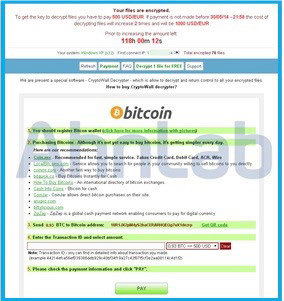
Figure 1. Ransom demand message for Bitcoins
Major types of ransomware are as follows:
■ SimpleLocker: A mobile ransomware that encrypts photos, videos or documents on a smart phone and demands a ransom; known to appear regularly since May, 2014
■ CryptoLocker: A form of ransomware that encrypts the files on the victim's PC and demands Bitcoins or cash, while threatening to keep the files locked until the ransom is paid.
■ Scareware: One of the simplest type of malware that generally disguises itself as a fake antivirus software, warning the user that the PC is full of problems and asking for a large payment to get rid of them. Some kind of this type of malware usually irritate users with a significant inconvenience by spamming the user with warning windows and popup messages or disabling other programs.
■ Lock-Screen: A ransomware that completely locks the victim PC and restricts access to it. This type of ransomware usually displays several full-sized windows to block the screen, showing the United States FBI or other global law enforcement agency logo and threatening the user with fines for illegal downloads.
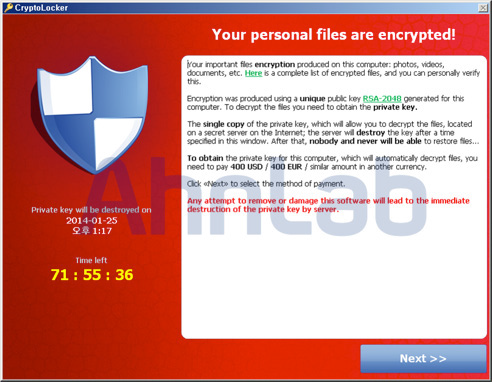
Prevention is always best solution. Any attempt to recover the system from ransomware, is costly and time consuming. Once system is infected with ransomware, the affected files are barely restored. The next section examines prevention methods as well as how to restore encrypted data if a victim PC is infected by ransomware.
The most famous ransomwares are recently re-distributed via spammed email messages. Email recipients should exercise caution when opening emails from unknown sources, especially one that has random characters or unverifiable domain names. If suspicious-looking emails are received, even from trusted and reliable sources, the emails should not be clicked to open. Furthermore, the attachments included in those emails should be deleted immediately without opening or execution.
One best practice is to back up important files such as business or confidential documents using the method recommended by the Operating System manufacturer, and a practice of invoking off-site backups can be the ideal option as another layer of security.
Another best practice is to set the general user access of important documents to "read-only" mode. This can prevent files from being “hijacked” in ransomware attacks. Ransomwares attempt to encrypt targeted files, and when the file is in “read-only” mode, this attempt may block the ransomware attempts to modify the file through encryption. As a policy, critical and important files should be stored in read-only mode. Only change this access to read, write and execute (full access) setting when working with the file or when necessary. After which, the access setting should be reverted to read-only for storage.
In addition to PCs, Android-based smart phones have been regular targets of ransomware that take control of data stored on the device and demand ransom payment. Smart phone users should avoid downloading applications from online locations other than those offered by official mobile application marketplace like GooglePlay, etc. The option to allow the installation of applications from unknown sources should always be OFF. Another practice of checking the mobile application's source and reviews before downloading is also important since malicious applications sometimes find their way to the official market.
One known method of distributing malicious applications for smart phones is called “Smishing”, short for SMS phishing. Smishing occurs when a user receives an SMS or instant messaging for smart phones with a URL, usually enticing the recipient to click the link. When the URL is clicked, a malware is downloaded into the smart phone. It is strongly cautioned that one should be very careful when following a link embedded in the text or instant messages. It is always a good practice to install security applications or smishing detectors for mobile devices and always kept active.
A recovery method from a malware infection is to boot the smart phone in safe mode (procedures vary depending on the manufacturer), as an example, go to [Settings] → [Device Manager] and deactivate the malicious apps that contain ransomware. The app can then be deleted from the list of installed apps.
How does AhnLab MDS defend against these attacks?
Let's find out how AhnLab MDS, AhnLab's next-generation threat response security solution, mitigates the latest types of ransomware.
AhnLab MDS (Malware Defense System) is a security solution that combats the latest malwares and exploits, by employing a "detect-analyze-monitor-respond" process to mount an effective defense system against targeted attacks and advanced assaults from "advanced persistent threats (APTs)."
1. Ransomware attack process
Attackers or hackers disguised malware as a popular screensaver (*.scr file) with a download hyperlink embedded in a blog site or social networking site frequently visited by the target. The target user, as expected, downloads and executes the screensaver installation file, all of which, the process seems normal with no suspicious events. However, after the execution of the installation file, the malicious code in the screensaver file secretly executes codes to initiate the download of additional malware and subsequently installed onto the target system.
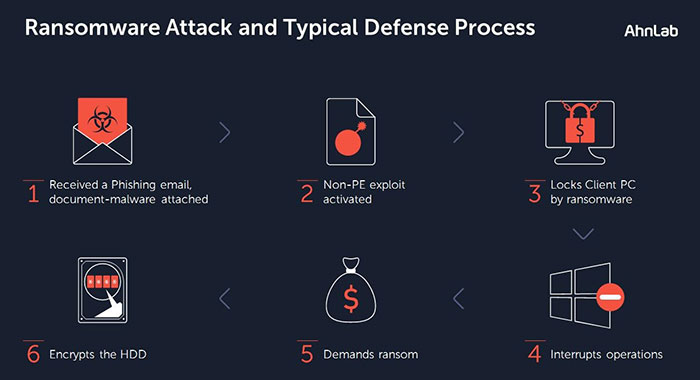
Collectively, the malwares are jointly activated as a ransomware and commenced the process to encrypt the hard disk drive (HDD) in the PC, and forces a reboot. On boot, instead of the normal boot chain, a threat message typical to ransomware is displayed claiming that "the password to decrypt the files will be provided once a payment is made" to a certain account. If a payment is not made and decryption password not provided, decrypting the HDD becomes permanently impossible.
2. AhnLab MDS ransomware response process
Let us now examine how a ransomware infection can be dealt with effectively using MDS.
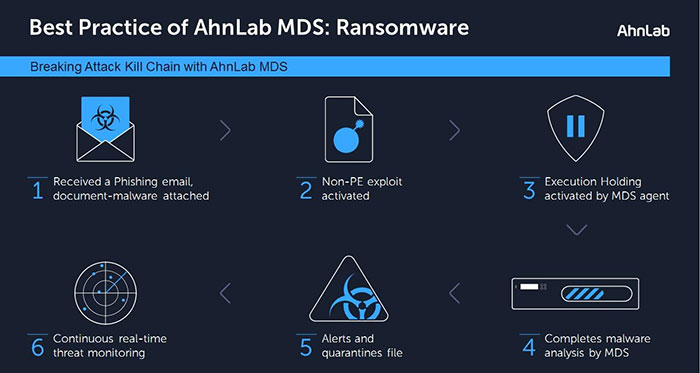
During the course of the malware being activated secretly between steps 2 and 3 in Figure 4, the MDS agent detects that additional process as a "suspicious new executable file". The MDS agent activates its "execution holding" function and sends that file to MDS for analysis.
While MDS agent is holding the execution of malware, the MDS performs a dynamic analysis to determine the threat severity of the malware. After few second of analysis, MDS agent receives a threat notification feed from MDS and moves to delete or quarantines the file according to the severity result of the analysis. This security chain and advanced technology protects the user's PC against unknown malwares affecting the client PC.
Up to this point, we have examined how MDS mitigates new or unknown malwares specifically ransomware threats. Information on new malware collected during this process is carefully studied by the AhnLab Smart Defense (ASD), the AhnLab in-the-cloud analysis system to identify, classify and issue a signature if not previously known. AhnLab's technology offer include a full suite of security solutions including V3, AhnLab's antivirus program; V3 Mobile, security solution for mobile devices; TrusGuard, a network security solution; and much more.
AhnLab insists the delicate balance of the three major pillars of security - people, technology and process, to prevent and respond effectively against new threats such as ransomware. It is of paramount importance for AhnLab to provide, the most optimal security technology for an organization's IT environment, implement best business process for maintaining security, and ensure that everyone in the organization is aligned to the importance of security.


