Different Priorities Need Different Views – AhnLab TIP Custom Dashboard

With security news and threat intelligence flooding in daily, filtering information relevant to your organization grows increasingly difficult. Each security team has different threat priorities. Some organizations monitor nation-state APT movements. Others track phishing campaigns and IOCs targeting their brand. And some prioritize newly discovered critical vulnerabilities. Yet most teams still view threat intelligence through the same dashboard and standardized format.
Just as monitoring priorities differ across organizations, the way we view threat intelligence must differ too. AhnLab addresses this with Custom Dashboard—a new feature in AhnLab TIP that personalizes your threat intelligence experience.
Only Threats That Matter, At a Glance
What is Custom Dashboard?
AhnLab TIP's Custom Dashboard is a feature that allows you to freely select and arrange threat intelligence widgets to build your own intelligence view tailored to your organization and role.
While maintaining the core threat statistics and analysis information provided previously, you can remove unnecessary information and reconfigure the screen to focus only on the threat information that matters the most. Instead of navigating between multiple menus and screens, you see critical threats on one intuitive dashboard—boosting both analysis efficiency and response speed.
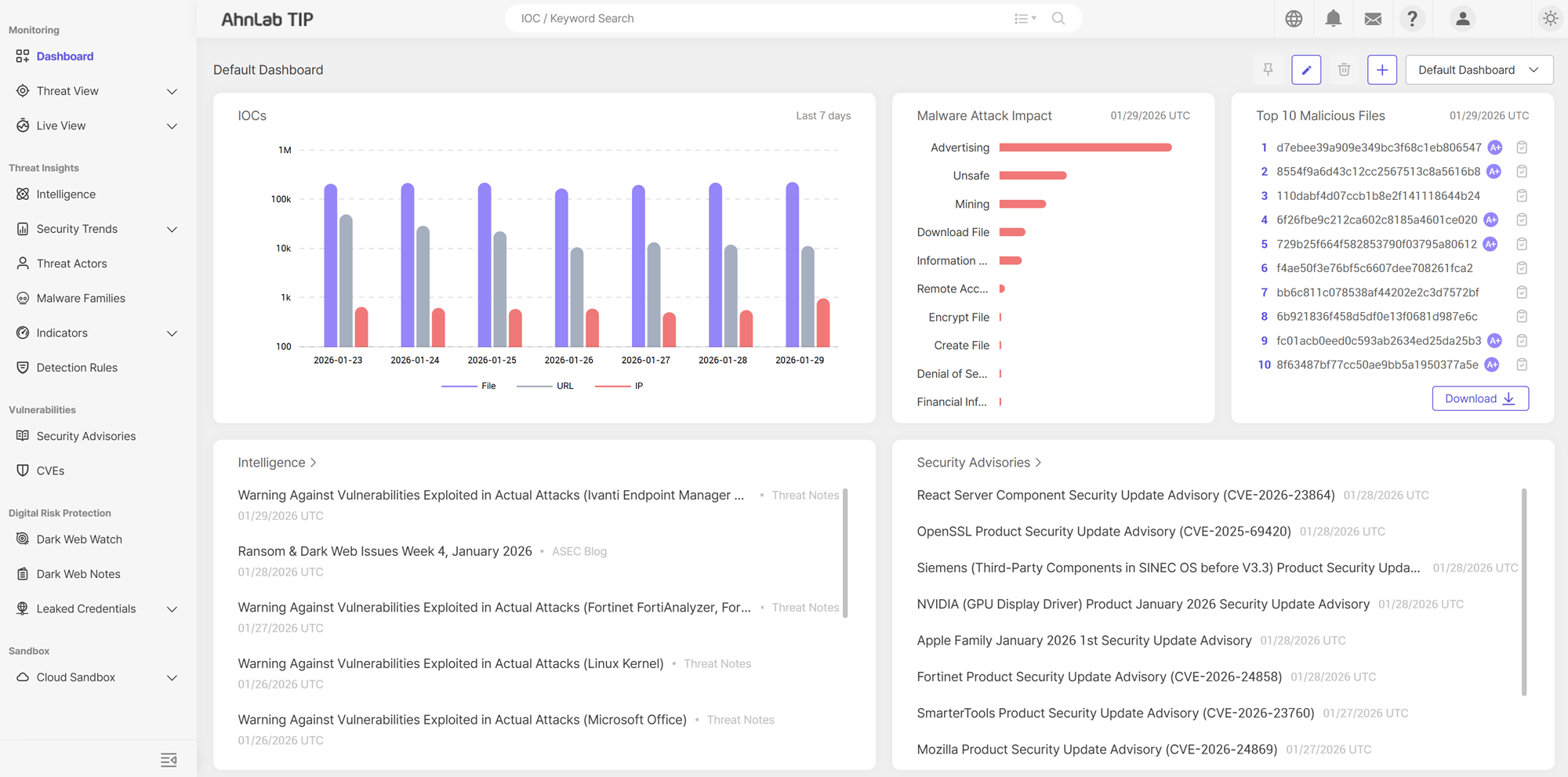
AhnLab TIP Custom Dashboard
Key Widgets
AhnLab TIP’s Custom Dashboard is designed for flexible configuration, allowing users to select widgets based on their role and operational goals.
- IoC-based Threat Trends: Visualize threat trends based on IoCs such as files, IP addresses, and URLs
- Bookmarked IOCs: IOCs your organization monitors closely
- Nation-State & APT Groups: Review recent attack activity and reports related to specific countries and APT groups
- Critical & Emerging Threats: Monitor high-severity and newly emerging threats requiring immediate attention
- Corporate/Brand-Related Threats: Monitor threats related to your organization and brand keywords
*Widget options may vary based on service tier and user permissions.
By combining these widgets, security teams gain at-a-glance visibility into priority threats and trends—staying focused on what matters most.
Real-World Use Cases
1. Daily Threat Monitoring for SOC Analysts
SOC analysts start their day by reviewing critical threat intelligence from the past 24 hours through their personalized custom dashboard.
- Trending activity from watchlisted IPs, malicious URLs, and malicious files
- Newly ingested IoCs
- TIP analysis correlated with events from internal security systems
Analysts can jump straight from critical threats on widgets to detailed analysis views. By displaying only frequently monitored, high-value indicators, analysts can minimize navigation time and accelerate response.
2. Industry-Specific Threat Monitoring
Threat priorities vary across sectors—finance, public sector, and manufacturing each face unique risks. Custom Dashboards let security teams focus on what matters to their industry:
- Specific attack vectors and techniques (phishing, APTs, vulnerability exploitation, etc.)
- Country or region-specific attack patterns
- Indicators tied directly to their organization's assets
While retaining the default dashboard, organizations can enhance it with custom dashboard tailored to their sector—enabling more efficient, focused monitoring.
3. Executive Summary Dashboards
Security managers and decision-makers can build summary-type custom dashboards focused on:
- Threat trend visualizations
- High-severity threat distribution
- Summaries of major recent critical threats
Leaders can gain instant visibility into security posture and threat evolution without diving into technical details—ideal for executive reports and stakeholder briefings.
What Makes AhnLab TIP Different
1. Exclusive AhnLab Threat Intelligence
AhnLab TIP delivers exclusive threat intelligence powered by data collected from AhnLab security solutions deployed across diverse industries worldwide. Our extensive sensor network ensures earlier detection of emerging threats and attack techniques.
2. Nation-State APT Threat Intelligence
Our geographical proximity to aggressive state-sponsored threat actors, including North Korea and China, has enabled us to develop deep expertise in nation-state APT threats. Leveraging this extensive experience, AhnLab delivers advanced intelligence on evolving APT campaigns, attack techniques, and adversary TTPs.
3. 30 Years of Cybersecurity Expertise, Powered by AI
AhnLab TIP doesn't just deliver more intelligence—it delivers what matters. By combining three decades of real-world experience with AI-driven analytics, AhnLab TIP delivers actionable intelligence on threats requiring immediate attention, empowering both security operations and strategic decision-making.
Frequently Asked Questions
Q. Can I still use the existing dashboard?
A. Yes. A default dashboard is provided to offer a standardized view of the overall threat landscape. For more targeted monitoring, AhnLab recommends creating additional custom dashboards aligned with your organization's security environment and operational goals for more tailored monitoring.
Q. Who is allowed to create custom dashboards?
A. Any user with the appropriate permissions can create and manage custom dashboards tailored to their role and use case.
Q. What information can I add to custom dashboard?
A. You can customize widgets with key threat intelligence from AhnLab TIP—including IPs, domains, URLs, and files—and view only the indicators and analysis items relevant to you on a single interface.
Q. Does the custom dashboard support real-time threat intelligence?
A. Yes. Custom dashboards are continuously updated based on the latest threat intelligence ingested and analyzed by AhnLab TIP, supporting both past trends and real-time threat activity.
Q. Can I create multiple custom dashboards?
A. Yes. Depending on your use case, you can create and maintain up to two custom dashboards—for example, one for daily monitoring, one for incident response or executive summaries—and switch between them.
Start Your AhnLab TIP Free Trial
AhnLab offers a 30-day free trial of AhnLab TIP for enterprise and public-sector customers. If you would like to build and experience custom dashboards tailored to your organization's operational environment, click the "Request Trial" button at the link below to start your free trial.
→ Try AhnLab TIP Today: https://atip.ahnlab.com

- AhnLab


