


How to Respond to Ransomware Attacks: Real-life Case Studies
AhnLab SEcurity intelligence Center (ASEC) provides insights gained from analyzing security incidents in the form of forensic reports via AhnLab Threat Intelligence Platform (TIP).
In this report, we selectively present ransomware attack cases to introduce attack techniques used by threat actors and maintenance checklists for ransomware prevention to minimize the spread of ransomware damage.
ASEC consistently monitors ransomware trends and publishes reports monthly. Subscribe to AhnLab TIP to access a wider range of threat analysis content.

Attack Techniques Found in Ransomware Incidents
Figure 1 illustrates the flow of ransomware attacks and key techniques, from the initial breach to establishing a foothold, lateral movement, and ransomware distribution phases, in a structured table diagram.
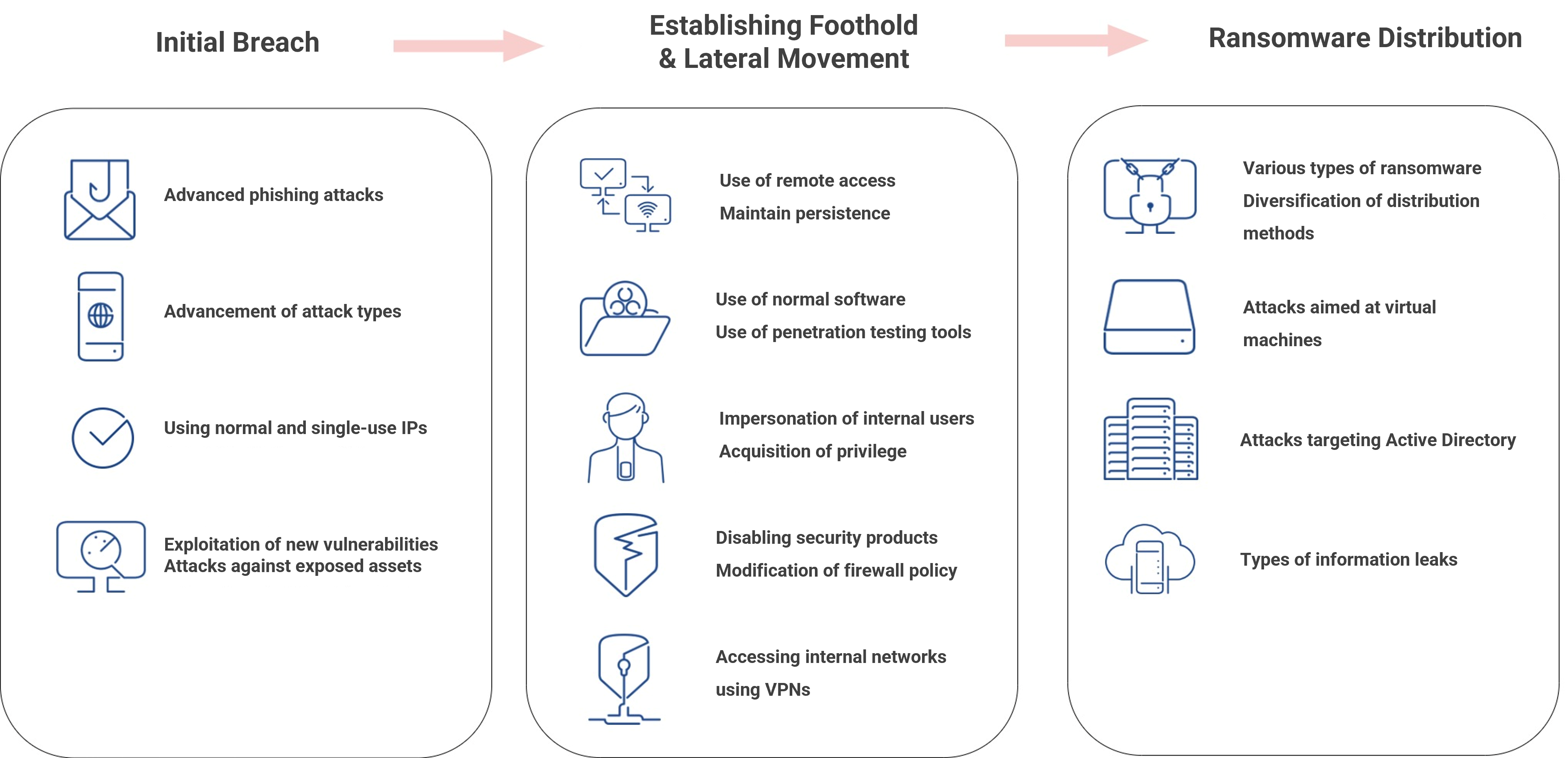
Figure 1. Attack points and techniques of ransomware threat actors
Table 1 below provides an overview of methods and characteristics of attacks that the threat actors launched in recent ransomware incidents.
|
Detailed Category |
Cases in Attacks |
|
Advanced |
- More meticulous phishing email content
|
|
Using normal and single-use IPs |
- Using Normal IPs to complicate threat actor detection
- IPs used in attacks are not reused |
|
Accessing internal networks using VPNs |
- Accessing internal networks using VPN equipment that is not applied with multi-factor authentication (MFA) |
|
Exploiting new vulnerabilities |
- Actively using 0-day and 1-day vulnerabilities
- Accessing systems by using service vulnerabilities
|
|
Attacks against exposed assets |
- Brute force attacks on exposed remote desktop protocol (RDP) ports
|
|
Use of remote access |
- Attackers prefer assuming control of the GUI
|
|
Maintain persistence |
- Registering backdoor files to be run automatically
|
|
Use of penetration testing tools |
- Using penetration testing tools to attack targets
|
|
Using normal software |
- Abusing normal software for attacks
|
|
Targeting AD environment |
- Collecting information about the Active Directory (AD) infrastructure
- Exploring systems with information about AD administrator accounts
|
|
Acquisition of privilege |
- Collecting local/domain administrator credentials
|
|
Disabling security products |
- Attempting to identify security products installed in systems - Stopping and deleting security services by controlling the GUI
|
|
Modifying firewall policy |
- Modifying local firewall policy
|
|
Various types of ransomware |
- Diversifying ransomware executable types
|
|
Impersonating internal users |
- Performing activities that prevent victims from distinguishing between internal users and threat actors
|
|
Attacks aimed at virtual machines |
- Increase of ransomware attacks targeting virtual machines instead of normal files
|
|
Diversification of ransomware distribution methods |
- Encrypting multiple system files in a batch by connecting to the base system via shared drives
- Executing ransomware via remote commands
- Distributing ransomware using AD servers' IIS services
- Distributing malware using AD group policies |
|
Collecting information |
- Collecting key data for data exfiltration
|
|
Types of information leaks |
- Leaking data to external data cloud services
- Leaking data to threat actors' servers (C2) |
Table 1. Examples of ransomware attack techniques and uses
Ransomware Breach Incidents
This section provides an overview of noteworthy cases selected from the ransomware-related incidents analyzed by AhnLab Forensic Intelligence ReSearch Team (A-FIRST), AhnLab's team of digital forensic experts.
The details of each case can be checked by subscribing to AhnLab TIP.
Case 1: Attack on the AD environments using Cobalt Strike
In 2019, the TA505 threat actor group distributed a mass number of spear phishing emails disguised as tax invoices sent from Korea's National Tax Service. The threat actor targeted companies that use Windows AD, employing Cobalt Strike to take control of the company's internal systems and procure the domain administrator privilege. This attack fortunately did not last to the point of ransomware distribution, but it did provide the team with the flow of an attempted attack.
*Note: Cobalt Strike is a threat emulation tool that is used for penetration testing but is also an attack tool that threat actors prefer to utilize.
Case 2: Infection of Magniber due to direct access to cyber-squatting website
Cyber-squatting refers to an act of procuring an online domain and using it for benefits. The threat actor registers domain names prone to typos in advance and has the victims redirected to the page. When users make typos while typing certain URLs, they are redirected to the threat actor's malicious website.
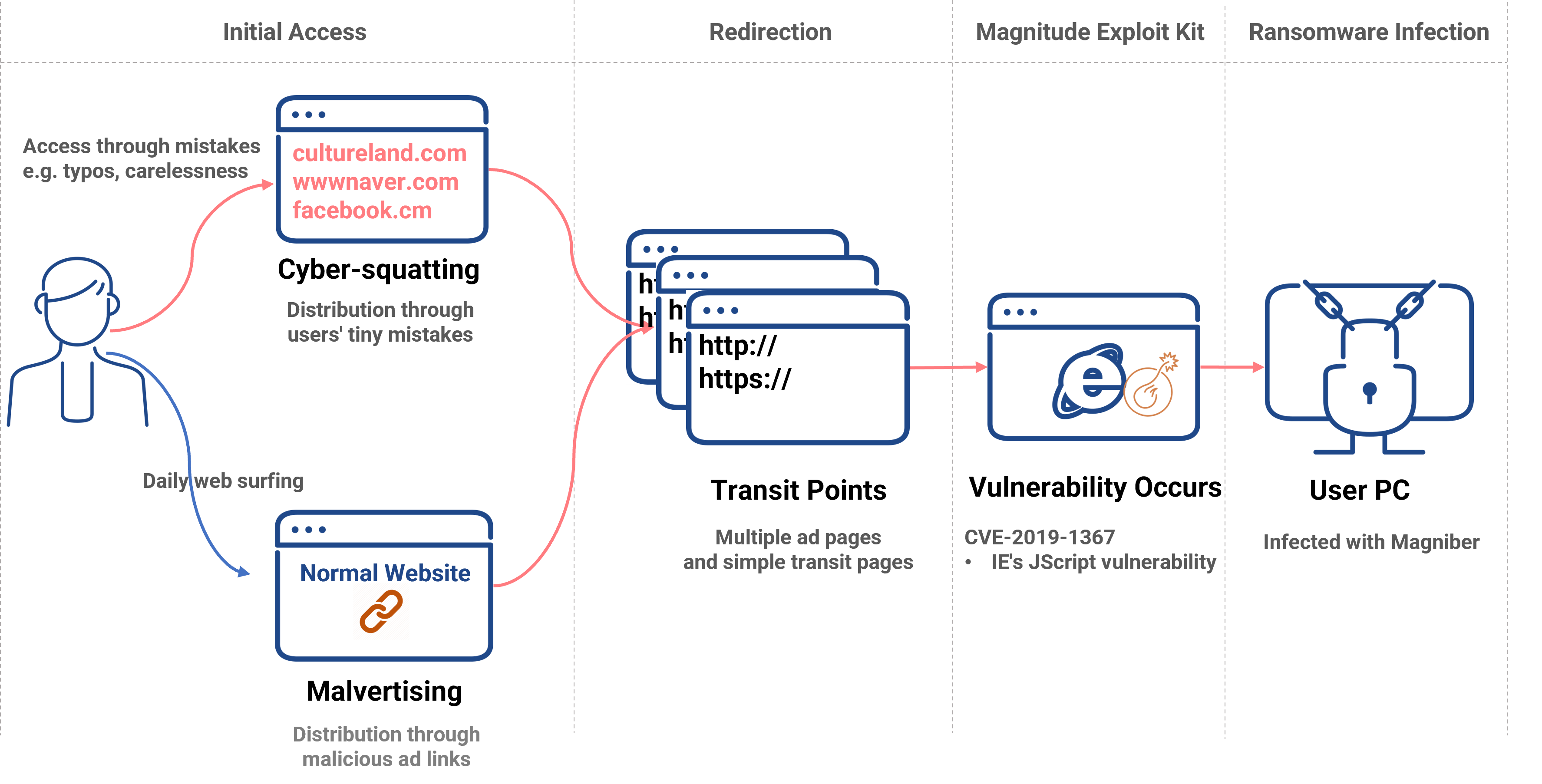
Figure 2. The flow of Magniber infection by accessing the cyber-squatting website
The victims, after being redirected multiple times, are infected by the ransomware via the JScript vulnerability of Internet Explorer. These attacks are usually indiscriminate, but this case shows that threat actors can target specific organizations by gaining domains that are similar to those of target organizations.
Case 3: Infection of Lockis due to a company's poor anti-malware management policy
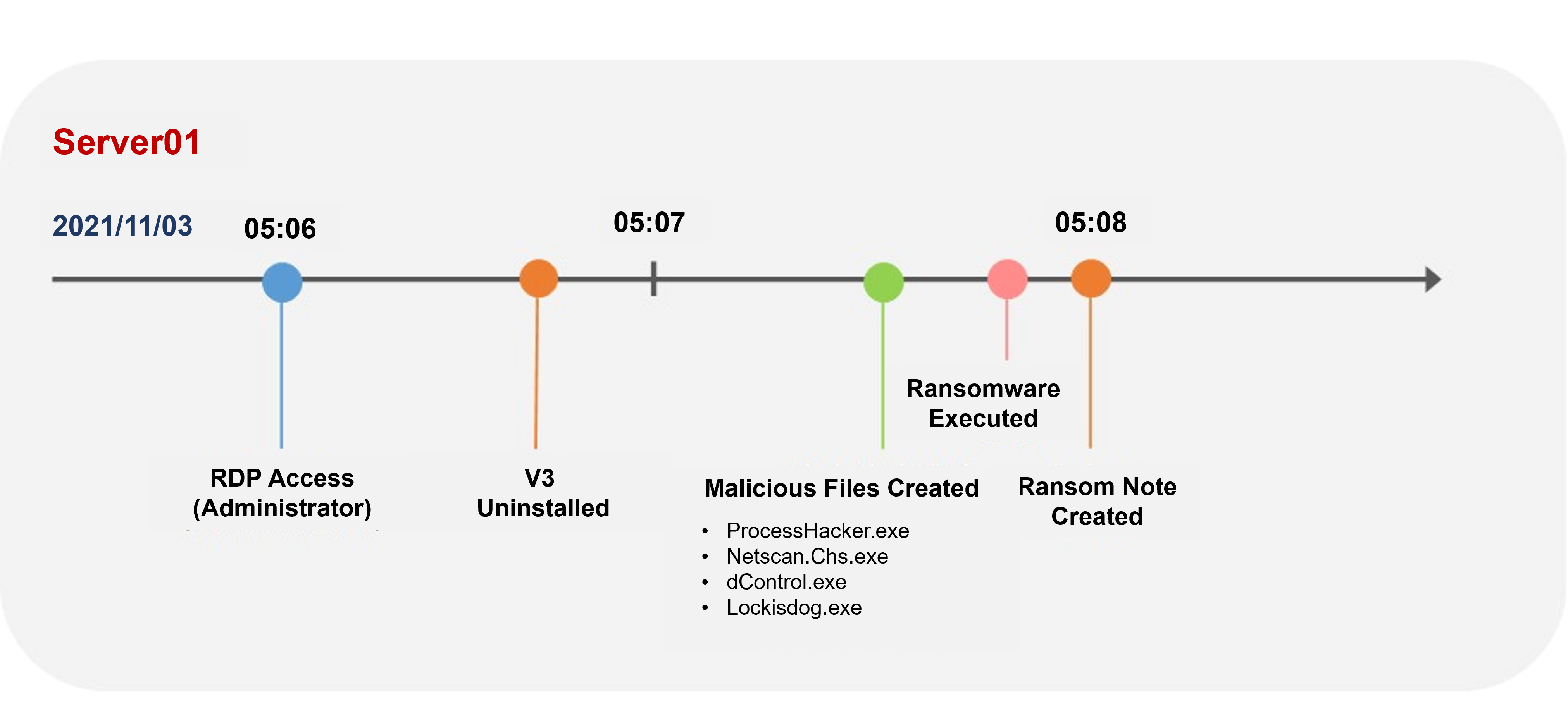
Figure 3. The infection process of Lockis ransomware
The threat actor performed a lateral movement via RDP after acquiring the AD administrator privilege. After gaining the GUI privilege, the threat actor directly deleted the anti-malware software installed in the infected system and ran the ransomware file (Lockis). The ransomware file used in the attack was a malicious one that can be detected by an anti-malware product, meaning that the incident could have been prevented had the program remained undeleted. This case reaffirms the importance of managing policies to prevent anti-malware programs from being deleted arbitrarily.
Case 4: Infection of DarkSide - why remediation alone is not enough when infected by malware
The threat actor used the AD group policy in the domain controller (DC) server to distribute Darkside after acquiring the AD administrator privilege. The victim's internal system had been exposed and vulnerable an extended period and was breached multiple times over the previous 2-3 years. Damage could have been mitigated had the victim quickly discovered the infection through security maintenance, etc.
Case 5: Infection of Hive ransomware that debilitates Windows Defender
The threat actor used a shared folder to try distributing Hive via the DC server after acquiring the AD administrator privilege. However, after the ransomware file was detected by Windows Defender, the threat actor directly accessed the system using RDP to disable Windows Defender and execute the ransomware.
Case 6: Infection of Gwisin ransomware targeting a Korean company
The threat actor inserted a web shell into a server located in the DMZ. Afterward, they stole the AD credential to access the AD server and installed the IIS server into the AD server to distribute the ransomware to systems registered in the AD.
Case 7: Crysis ransomware that infiltrated the systems via RDP and infected the ESXi Server
After accessing the company's internal server through a brute force attack, the treat actor mounted the VMware ESXi server via Secure SHell FileSystem (SSHFS) and ran Crysis. The attacker chose virtual disks that contained VMware's virtual disk files as the targets for encryption. This is the case where the threat actor connected file systems of Linux servers to the Windows system and encrypted the data using the ransomware exclusive to Windows.
Case 8: Combination of RDP exposure and easy password is a recipe for ransomware
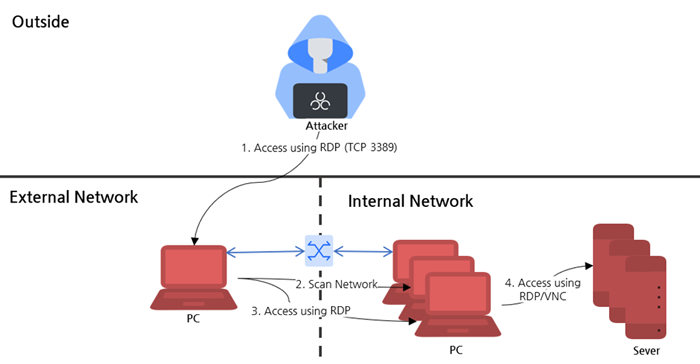
Figure 4. The flow chart of the threat actor's internal access
After confirming that the target had RDP exposed to the external Internet environment, the threat actor gained access by launching a brute force attack and scouted the inside to additionally access the internal network systems using the RDP. This is the case in which the threat actor used an administrator account that shares the password with other accounts to spread damage to key internal networks.
Case 9: Ransomware infection through a shared drive
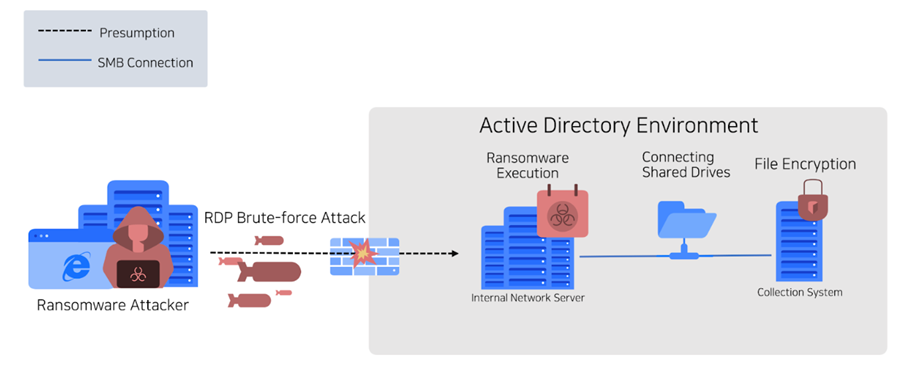
Figure 5. Ransomware attack using a shared drive
In this case, instead of distributing ransomware to all systems, the threat actor connected to multiple systems from a few base systems to distribute the ransomware.
Case 10: 1-day attack exploiting the Atlassian Confluence vulnerability
In this case, threat actors attempted attacks using the Atlassian Confluence vulnerability (CVE-2023-22515 and CVE-2023-22518) and distributed the C3RB3R ransomware. Recently, several vulnerabilities related to Atlassian Confluence have been revealed, and servers that have not applied with the Atlassian Confluence vulnerability patch or lack in up-to-date patch management have become targets of 1-day attacks.
Maintenance Checklist to Prevent Ransomware Incidents
The ASEC team has analyzed attack techniques that the threat actors used in ransomware incidents and selected checklist items for breach prevention. Users may prevent breaches before they happen by checking the following items to increase the difficulty of attacks and reduce the possibility of breaches by increasing the attack detection rate.
|
Type |
Item |
Details |
|
Policy management |
Administrator account |
- Delete unnecessary administrator accounts - Grant administrator privileges to minimum personnel |
|
Password Management |
- Forbid use of default/shared passwords - Forbid use of automatic account/password input for web browsers - Forbid showing passwords on password hints - For PCs authenticated with AD administrator accounts, reboot them after completing the work
|
|
|
Management of areas |
- Delete or minimize sections exposed unnecessarily
- If access restriction is required, set minimum permission
|
|
|
Shared drive |
- Disable default sharing |
|
|
Remote desktop |
- Disable remote desktop service - For server assets that require remote management, manage them separately and limit accessible systems |
|
|
Firewall policy management |
- Manage policies in the way of disabling protocol communications prone to exploits by threat Actors
- Allow communication separately only if needed and monitor networks - Configure inter-server access policies
|
|
|
Asset management |
EoS asset management |
- Send update notifications for OS, applications, and services that have reached end-of-support - If an update is necessary, monitor the subject separately |
|
Vulnerability monitoring and management |
- Send security advisories and monitor new vulnerabilities - When new vulnerabilities are found, identify vulnerable assets and take measures
- Form monitoring measures for existing vulnerabilities in case new vulnerable assets appear |
|
|
Security products |
VPN |
- Inspect the configuration of VPN products used outside to access the internal network
|
|
Use of anti-malware products |
- Ransomware detection
|
|
|
Use of product protection features |
- Enable features to protect security products from being terminated/deleted
|
|
|
Minimization of security blind sides |
- Must form monitoring measures for activities occurring inside network/zones
- Minimize security blind sides using EDR/XDR security products |
|
|
Monitoring |
Monitoring remote access events |
- Enhance system access monitoring
- Must monitor abnormal behaviors
|
|
Outbound traffic |
- Must monitor outbound traffic
|
|
|
Windows Defender event monitoring |
- Windows Defender activation event monitoring
|
|
|
Disaster recovery |
Data backup plans |
- Form data backup/recovery strategies
- Protect virtual disks/hypervisor assets
|
|
Service recovery measures |
- Form disaster recovery (DR) measures
|
|
|
Simulation training |
Campaigns to raise security awareness |
- Breaches mostly start with user-targeted attacks
|
|
Incident response simulation training |
- Proceed with training for quick real-life breach response and assess procedures
|
Table 2. Maintenance checklist to prevent ransomware incidents
Checklist for analysis of ransomware incidents
Lastly, the team has selected items that need to be inspected for the effective analysis of finding the causes of ransomware incidents. Without the analysis of causes, the same ransomware strains may re-infect systems through the same vectors following the systems' recovery.
As such, in case ransomware incidents occur, administrators must identify malicious files that remain in systems by analyzing causes, prevent recurrence by analyzing the flow of breaches and causes, and make preparations to restore systems.
|
Item |
Details |
|
Inspection of procedures for sustaining affected systems |
- Check whether the systems can be quarantined with networks converted and the power on
|
|
Inspection of the log storage period of security equipment |
- Security equipment logs should be retained for at least 6 months
- If VPN is used, check whether actual users can be identified via VPN use logs
|
|
Collection of security equipment logs in case of incidents |
- Collect security equipment logs that are available at the time of breach detection
|
Table 3. Maintenance checklist for the analysis of ransomware-borne breach
To check more diverse ransomware analysis data and threat intelligence content, subscribe to AhnLab TIP, AhnLab's threat intelligence platform.


