


AhnLab's Security Solutions Reborn: Accelerated Innovation
AhnLab recently presented new products and version updates for its endpoint, OT, and cloud security areas. First, the OT endpoint security solution AhnLab EPS saw an upgrade to version 3.0 from 2.8. Next, there was an addition to the AhnLab EPP product line with the release of AhnLab EPP Device Control (EDC), a device control solution for endpoints. Also, the cloud workload security platform AhnLab CPP was expanded with the addition of the Container Security product suite.
Let us take a look at the security effects these product updates and new releases will bring to AhnLab customers in the second half of this year.

AhnLab EPS 3.0: Flexible and Stable Operation Optimized for IT/OT Environments
AhnLab EPS, an OT endpoint security solution optimized for OT system security, plays a crucial role in consolidated cyber-physical system (CPS) security that encompasses both IT and OT. The 3.0 version released this year includes major improvements to its features, performance, and specs. AhnLab EPS will be able to provide greater OT endpoint security capabilities to its customers through this upgrade.
Here is a brief look at the changes implemented in AhnLab EPS 3.0.
AhnLab EPS is provided as a server for central monitoring and policy management (EPS Server) and an agent that is installed in Windows and Linux devices (EPS Client). First of all, EPS Server performance is now improved to support up to 20,000 agents instead of 8,000 which was the previous maximum. Customers can also operate AhnLab EPS 3.0 in virtual environments such as VMware and AWS. For the browser console, Google Chrome and Microsoft Edge are supported. Previously supported by AhnLab EPS 2.8, Internet Explorer 8.0 can now only be used for downloading files and cannot use the console feature. Furthermore, AhnLab EPS 3.0 expanded its range of client OS support with the addition of Windows 11 23H2. For a better presence in the global market, the solution now supports Japanese in addition to Korean, English, and Chinese.
The key changes in AhnLab EPS 3.0 are as follows.
1) Major UI/UX Overhaul
There was a major overhaul to the web framework and UI style, which had not been changed for more than 10 years since AhnLab EPS 1.0. The new version implemented an innovative design style in accordance with the latest trend, and its UX improvements facilitate more convenient product use and better user experience. Such an overhaul is expected to provide more intuitive product usage and monitoring to its customers.
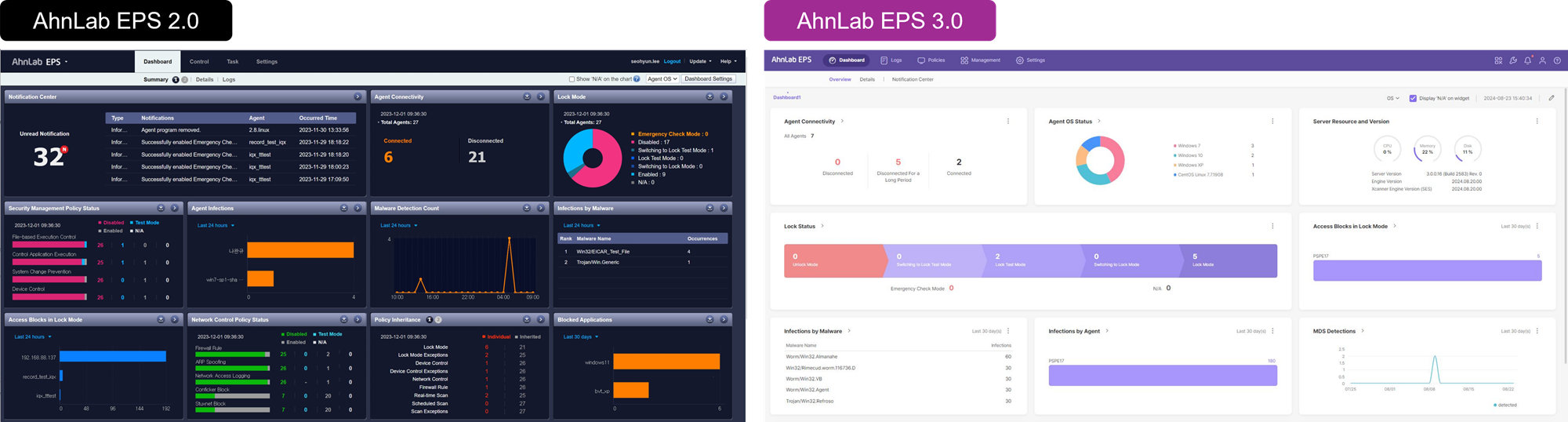
Figure 1. Comparison of EPS 2.0 and EPS 3.0 Dashboards
2) Integrity Scans and Blocks for Key Files
AhnLab EPS 3.0 monitors any changes made to the key files required for system operation in an EPS facility environment and blocks the changes if needed. Users can now manage policies regarding integrity checks and integrate agents for creating file baselines. The baseline of files set to monitor and their change history is visible under the File Integrity Monitoring tab, and the block history of files set to block is available in the agent log.
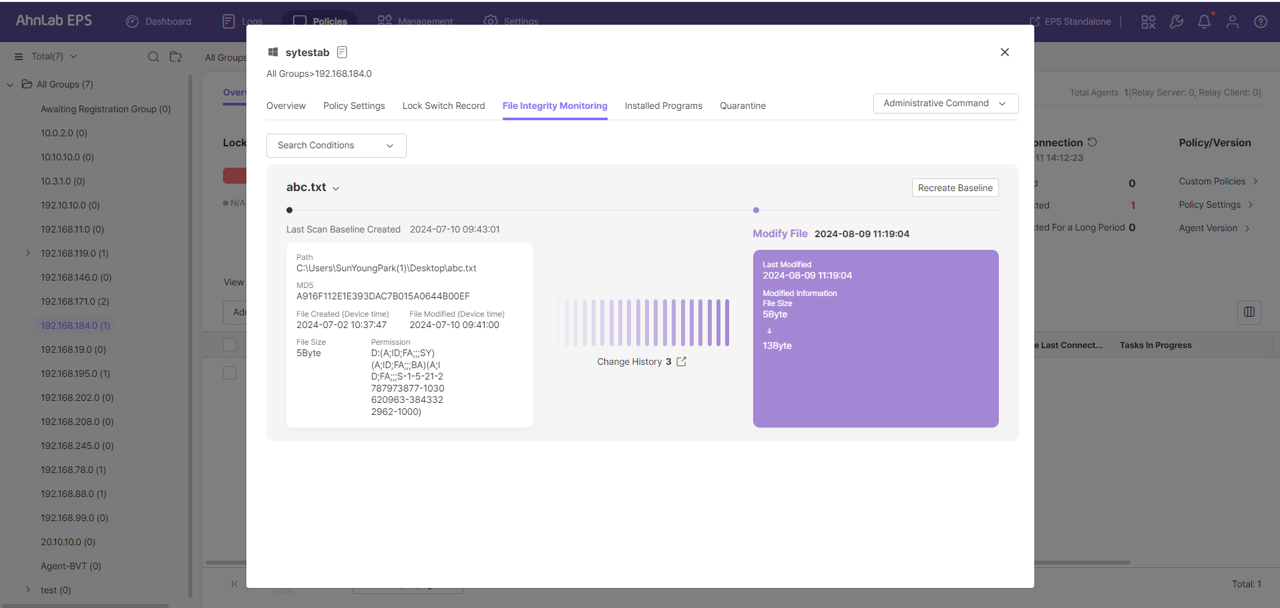
Figure 2. AhnLab EPS 3.0 - Monitoring File Integrity
3) Collecting and Managing Agent OS Patch Lists
AhnLab EPS 3.0 collects detailed OS information about devices through the agent, providing visibility. Users can refer to detailed OS information about operating devices and this information can also be used for patching vulnerabilities or responding to them.
4) Searching for Systems Without Agents in Relay Client Air-Gapped Networks
AhnLab EPS 3.0 is equipped with a feature to search for and look up systems that do not have an agent installed in an air-gapped network where a relay client is operating. Thus users can search for systems without agents using the active scan method, enabling a more efficient operation.
5) Allowing Emergency Devices in Emergency Maintenance Mode
AhnLab EPS 3.0 allows the execution of devices in emergency maintenance mode when the relevant settings are enabled. Users can also set an emergency device execution password through group/agent policy settings, and the maximum duration for the emergency maintenance mode has been extended from 24 hours to 72 hours.
6) Improved Group Management Features
To support environments that use multiple-level structures and group management, AhnLab EPS 3.0 expanded the levels supported by agent group management from 5 to 10. This improvement will support management features without the limitations caused by customers' various environmental configurations.
Container Security: Enhanced Container Environment Security for Enterprises via Kubernetes Integration
AhnLab added the container security module Container Security to AhnLab CPP in July this year. With this addition, AhnLab CPP now has container security capabilities on top of the existing anti-malware, host IPS, and application control modules.
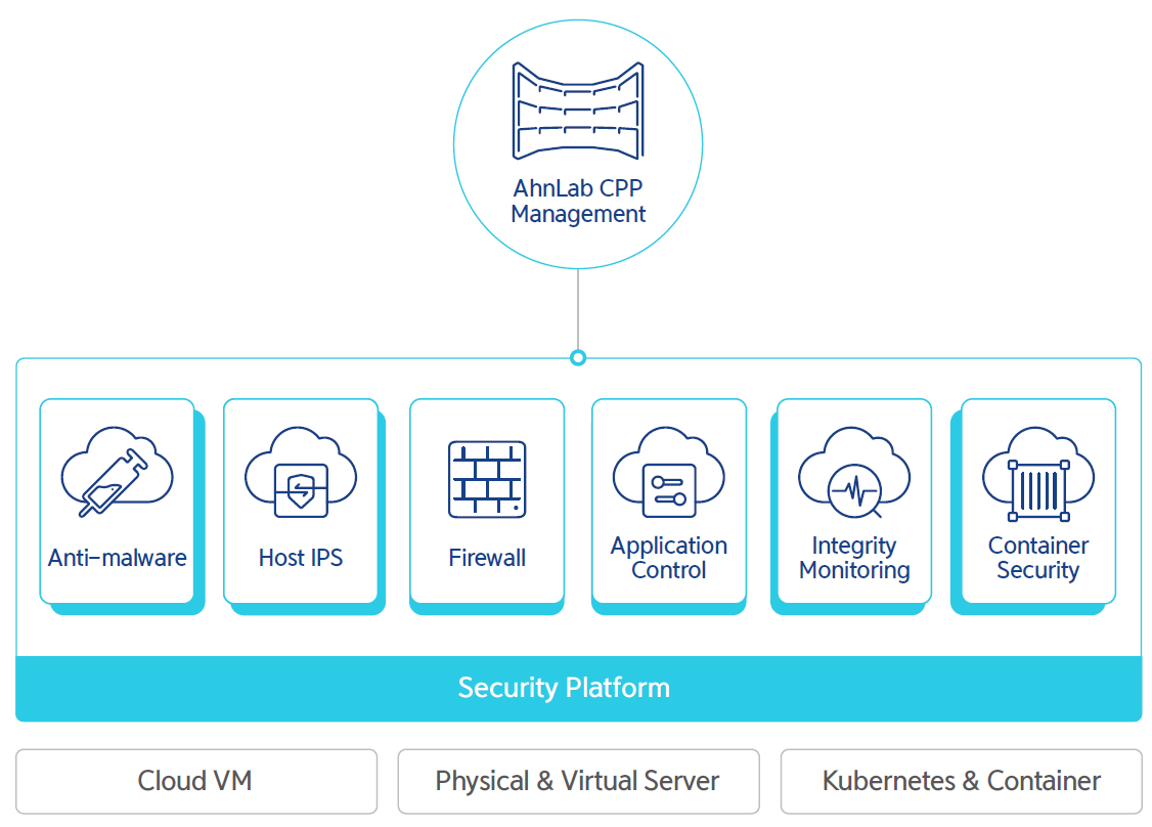
Figure 3. AhnLab CPP Components and Integration Scope
Container Security identifies the containers running in Kubernetes environments to provide a topology view and performs malware and vulnerability scans for the identified container images. This module helps companies enhance their container environment security and swiftly identify and respond to potential threats. Container Security can be used after upgrading CPP Management and verifying a Container Security license.
The strengths of AhnLab Container Security can be divided into three factors as shown below.
1) Simple Kubernetes Cluster and Container Registry Integration
Container Security integrates Kubernetes clusters through Kuberconfig and account integration methods, and it can also integrate various container registries such as Harbor, Nexus, Docker Hub, and Amazon ECR.
2) Visualized Kubernetes Topology
AhnLab CPP's Container Security visualizes clusters, namespaces, and feed information as a topology image, allowing security managers to easily identify the resource structure and security status.
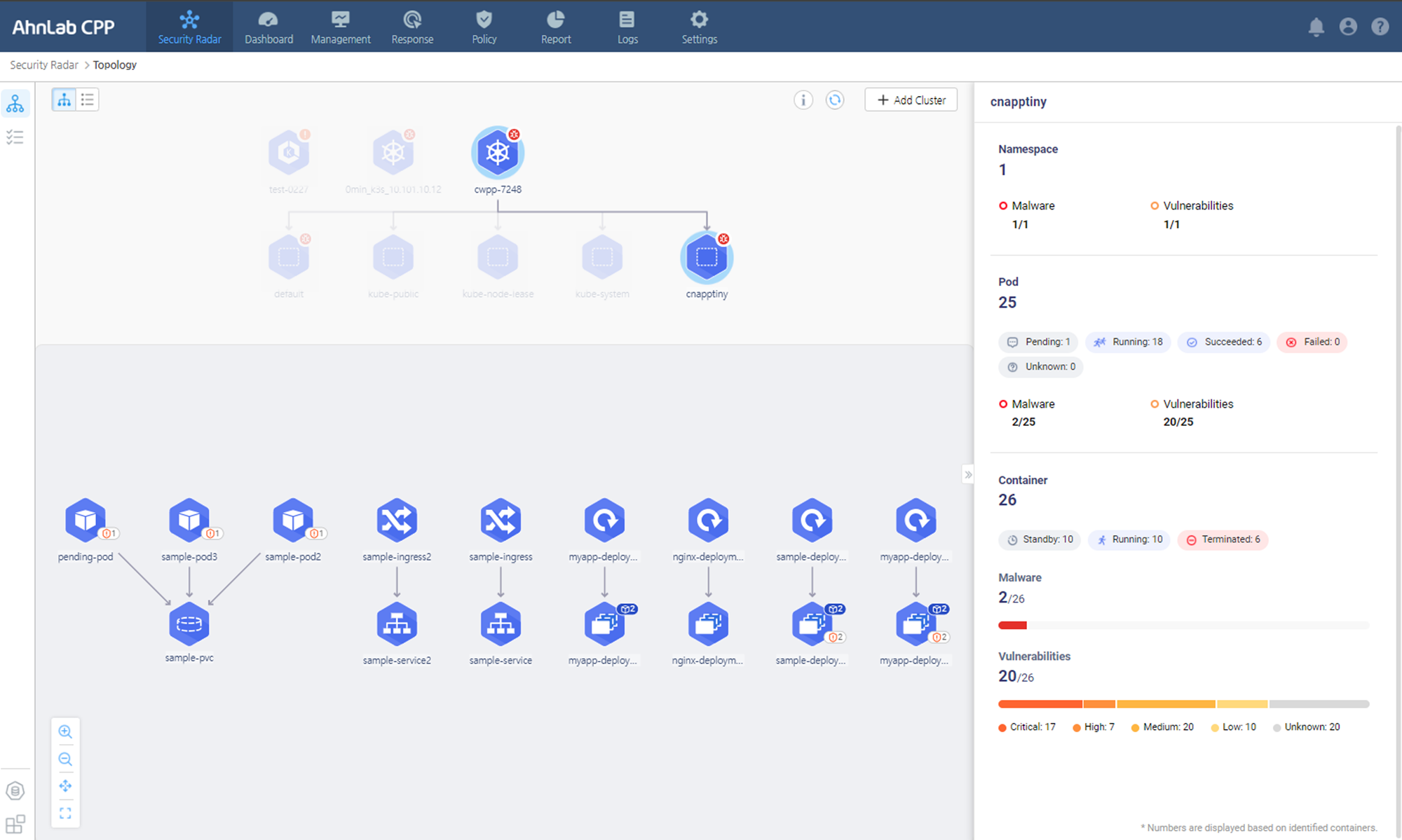
Figure 4. AhnLab Container Security - Container identification and visualization of asset topology
3) Identification and Scanning of Operating Containers
Container Security integrates the container image registry used for Kubernetes distribution to identify the information of containers running in the Kubernetes environment. It can then perform malware and vulnerability scans for the container images.
When the scans are complete, the module displays the results on the topology screen. It also provides diagrams and a feature to check the status of vulnerable images being distributed across Kubernetes' clusters, pods, and containers. If there are no images in the integrated container image registry, Container Security provides a feature to configure integration with status information.
AhnLab EDC: Establishing Safe Business Environment Through Device Control and Consolidated Management
Released as a plugin for AhnLab EPP, AhnLab's next-generation endpoint security platform, AhnLab EDC is a device access and operation control solution. It establishes a more advanced threat response by controlling and managing access and operation of external devices such as USB, CD drives, and mobile devices in the internal infrastructure of a company.
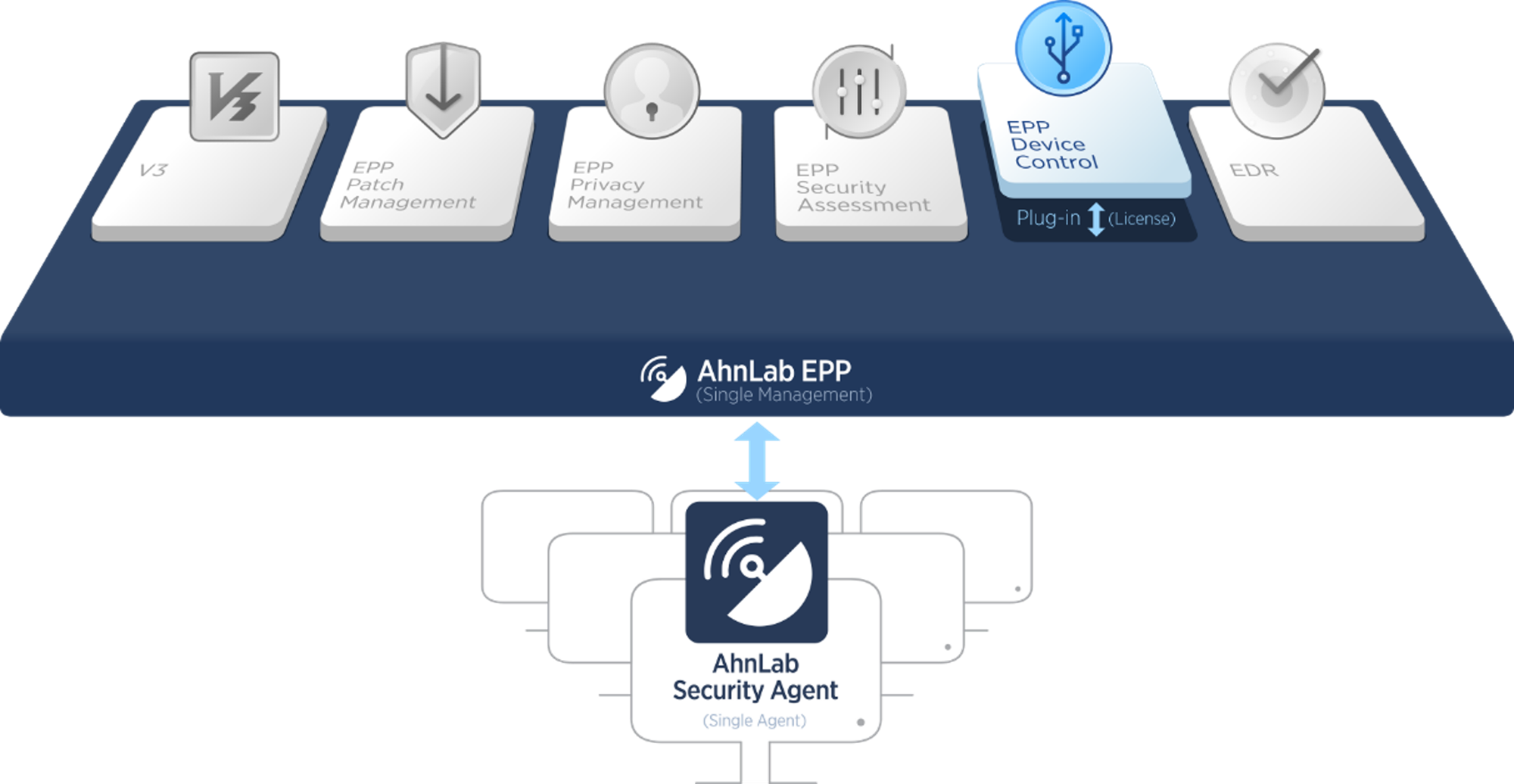
Figure 5. AhnLab EPP Module Composition
AhnLab EDC was newly released to serve the purpose of controlling malicious accesses to company assets from external devices, allowing companies to prevent domestic and international security risks in advance and respond to them swiftly. Key corporate data tend to be saved on endpoint terminals and external devices where administrators have low visibility, and as a result, there has been a surge in the number of attacks exfiltrating confidential corporate data via USB compared to the past.
As such, there is now a need for establishing a control measure for external storage devices that are being abused for data leaks and securing visibility to minimize the damage from a security incident. Furthermore, major information protection-related compliances, such as the Personal Information Protection Act, Act On Promotion Of Information And Communications Network Utilization And Information Protection, and ISMS certification criteria, are requiring control permissions for auxiliary storage devices. AhnLab EDC was designed to meet all these requirements.
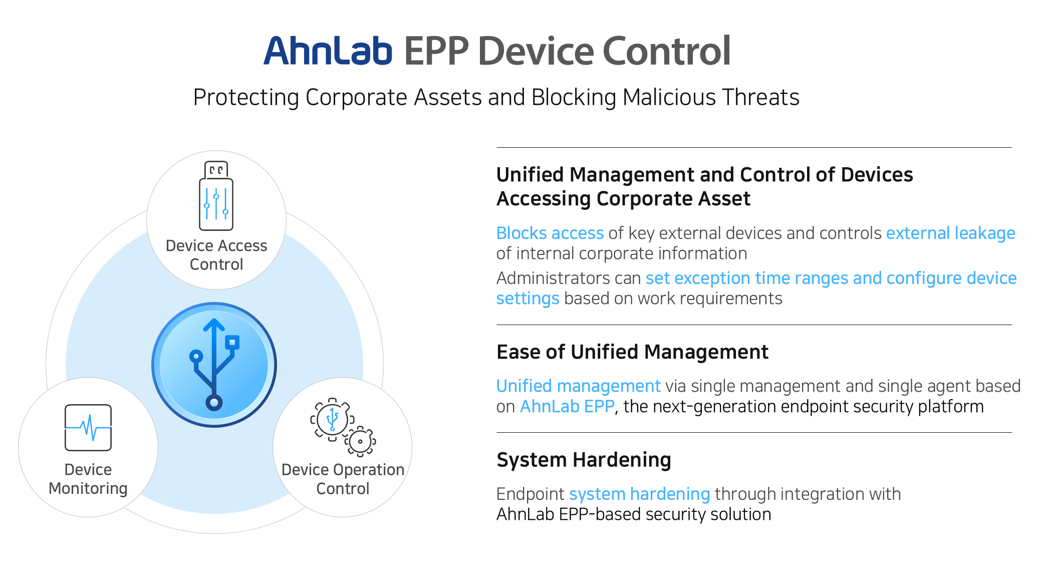
Figure 6. AhnLab EDC Concept
AhnLab EDC not only controls the operations of key external devices after they access and connect to the company's infrastructure and assets, but also offers user-friendly management options, including registering exception devices that can be flexibly expanded and configured based on the company's environment, and setting time ranges to restrict device control. Additionally, AhnLab EDC provides device control monitoring, statistics, and reporting functionalities.
AhnLab EDC operates on the AhnLab EPP platform, allowing for easy deployment with just a license application. It enables seamless integration with other AhnLab EPP plugin security solutions, including anti-malware, personal information management, patch management, vulnerability checks, and endpoint threat detection and response (EDR).
With AhnLab EDC, security managers can gain visibility into the use of external devices within the organization and safeguard key assets such as production facility servers and service systems from security threats like malware infections and data leaks caused by external devices. Moreover, AhnLab EDC ensures stable operation and management through continuous professional support service provided by AhnLab's security experts.
More details about AhnLab EPS, CPP, and EDC can be found on the AhnLab website.


![[AhnLab ISF 2026] How AI Is Reshaping the Future of Cyber Threats](/_next/image?url=%2Fimage-proxy%3Furl%3Dhttps%253A%252F%252Fcloudimg.ccs.ahnlab.com%252Fimg_upload%252Fcontents_center%252Fimage%252F2610237452519211.png&w=3840&q=75)
![[AhnLab ISF 2026] Opening](/_next/image?url=%2Fimage-proxy%3Furl%3Dhttps%253A%252F%252Fcloudimg.ccs.ahnlab.com%252Fimg_upload%252Fcontents_center%252Fimage%252F2610237450955827.png&w=3840&q=75)