


How to Secure WFH (Work-From-Home) Environments
COVID-19 has accelerated the trend of contactless interactions. As a result, many global companies have chosen to allow employees to temporarily or permanently work-from-home. This on the other hand, has brought along various security challenges and many businesses are struggling to keep their business assets safe.
How can businesses reinforce security in a WFH (Work-From-Home) environment? This article will introduce AhnLab’s solutions that is apposite in securing the remote work environment.

Working from home means business interactions are carried out in external environments where security is vulnerable and by vulnerable, it means that the security is always at the risk of various security attacks or issues, such as information breach.
To be a bit more specific, users working from home are faced with three main security risks. First, physical devices are always at the risk of being lost of being stolen, which could lead to leakage of data. Second, connecting devices to vulnerable wiredwireless networks could lead to another potential security incident. Third, there is always the risk of third party gaining remote unauthorized access to internal resources.
As stated above, remote working environments can create opportunities for numerous security threats. Thus, the lack of security updates can lead to increase of application vulnerabilities and the risk of being infected by new and variant malware. This places significant pressure on businesses managing devices in remote working environments.
If an attacker abuses this weakness and manages to successfully land an attack, it will not only result in a leakage of information, but it may also inflict serious damage to the business. This could lead to destruction of systems or disruption of businesses, and in the long term, lead to brand damage and loss of trust in business. To prevent these types of issues, businesses must always reinforce security.
2 Types of Remote Connections when Working from Home
Methods for connecting to internal network remotely can be divided into two methods: ‘indirect connection’ and ‘direct connection.’ Either one can be chosen based on the nature of the remote work and the company's business environment. Let us examine each connection method.
Indirect Connection Method
Indirect connection method is connecting to the internal network of the company from external network device via business network device of the company. This method is again branched into 2 types based on what program is used: Virtual Desktop Infrastructure (VDI) and Remote Access Program.
VDI method is connecting to the internal network, also known as air-gapped network, from the external network through the virtual internal device of the VDI. VDI can be located within the company’s public network or isolated, air-gapped network. It can also use internet cloud based VDI service, such as DaaS (Desktop as a Service). Remote work can be performed on the (virtual) internal device, which displays the image of a virtual desktop.
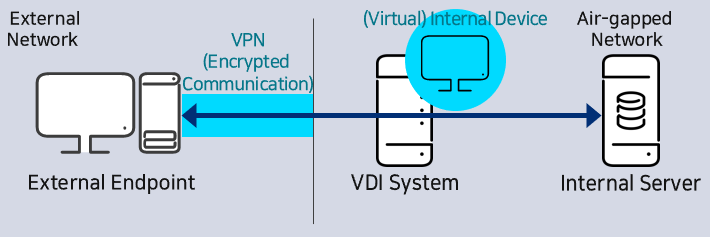
Figure 1. Virtual Desktop Infrastructure (VDI) Method
Remote connection program method is connecting from external network device to air-gapped network device for business tasks using the remote connection program. Directly connecting external network device to network device for task is possible, as well as connecting through an optional remote access server. Unlike VDI, it connects to the actual internal network device to perform tasks instead of a virtual desktop infrastructure.
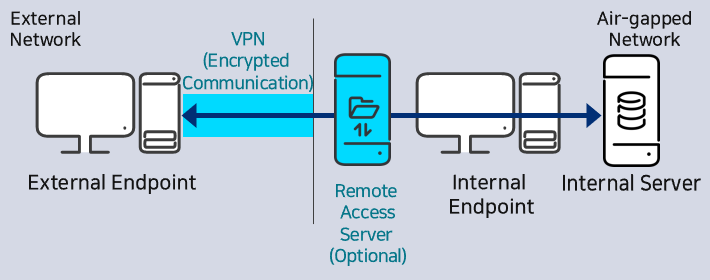
Figure 2. Remote Access Program Method
Direct Connection Method
Direct method is the method of directly connecting to the internal server without going through an internal device to perform tasks. When handling task from external device, task data is saved directly into the external device. Thus, users must be extra careful not to leak any data and take precaution when saving sensitive data onto the external server.
※ When choosing to connect external network devices via direct connection method, authorized endpoints (devices) must be used instead of BYOD (Bring your own device) to enable the company to control the security.
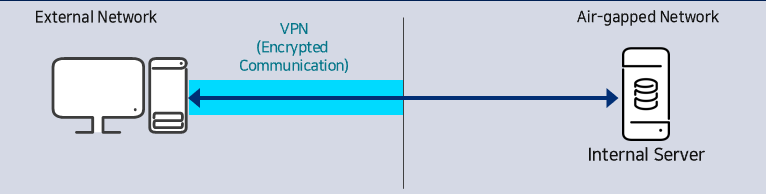
Figure 3. Direct Connection Method
AhnLab's Security Measures for Work-from-home Environment
AhnLab provides security measures for both direct connection and indirect connection. AhnLab's security process provides unified management, from downloading anti-malware programs and setting APT block measurements, to using up-to-date OS.
Most importantly, AhnLab strengthened security level of work-from-home environment through integration of AhnLab TrusGuard — AhnLab's network security solution — and AhnLab EPP Security Assessment (ESA). When AhnLab TrusGuard VPN client is executed, external network device that passed security pre-scan via AhnLab ESA is allowed VPN connection. If the external device has a security vulnerability, AhnLab ESA will provide the solution to the problem.
AhnLab's Security Measures for Indirect Connection
AhnLab provides 2 security measures for indirect connection. Both methods consist of three steps, in which step 1 and step 2 are the same.
In step 1, AhnLab Endpoint Protection Platform (EPP) is built in the external network for indirect connection device management. Then, AhnLab MDS server is also built. Afterwards, policy of AhnLab V3, AhnLab EPP, AhnLab ESA, and AhnLab EPP Patch Management (EPM) are configured, and the integrated agent for management of indirect connection device is created. Step 2 involves the installation of the integrated agent and integrated installation must be used to install the VPN client. The integrated agent consists of AhnLab EPP agent, AhnLab V3, AhnLab ESA, AhnLab EPM, and AhnLab MDS agent. Step 3 consists of two methods to conduct pre-scan: conducting from the client or the server.
Option 1: Client to AhnLab ESA Integration Configuration
This is a method of permitting connection after performing pre-scan from the client for indirect connection (VPN, VDI, and Remote Access Program), and integration is required to perform this method. In this case, the latest AhnLab ESA maintenance score is checked by the client. The client company must create and apply the integration, but AhnLab will provide the API needed for the integration. If the maintenance score is low, VPN connection will be blocked.
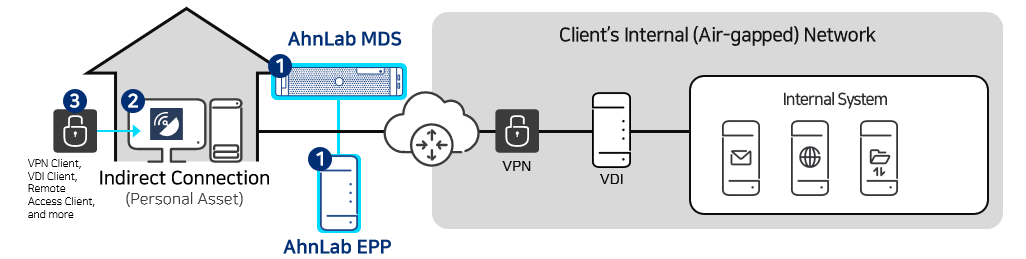
Figure 4. Indirect Connection Security Measures- Client to AhnLab ESA Integration Configuration
Option 2: Server to AhnLab EPP Integration Configuration
This is a method of permitting connection after performing pre-scan from server (Remote Access Program Server and VDI server) for indirect connection. In this case, the latest AhnLab ESA maintenance score of the device saved to AhnLab EPP is checked from indirect connection program server. Just like option 2, the company of the indirect connection program must develop and apply the integration, and AhnLab will provide the company with the API needed for the integration. If the maintenance score is low, connection via remote connection program will be blocked.
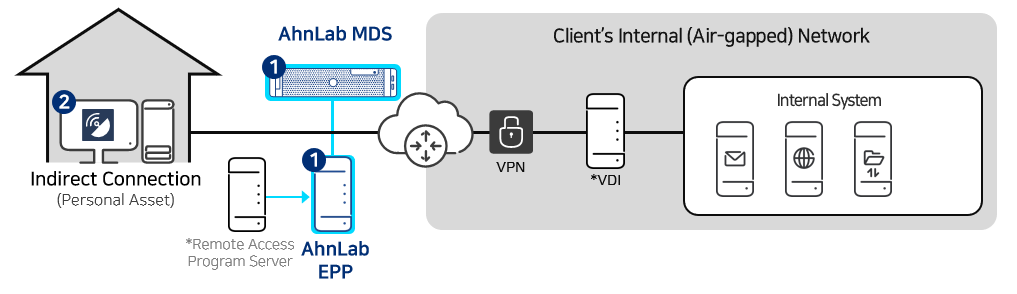
Figure 5. Indirect Connection Security Measures - Server to AhnLab EPP integration configuration
AhnLab's Security Measure for Direct Connection
Security measure for direct connection consist of two steps, and the flow is not too different from the indirect connection. In step 1, AhnLab EPP for management of direct connection device is built in the internal network, and AhnLab MDS server is also built. Existing AhnLab EMS can be used instead of AhnLab EPP. Afterward, AhnLab V3, AhnLab ESA, AhnLab EPM policies are configured, and the integrated agent is prepared. In step 2, the integrated agent that consists of AhnLab EPP agent, AhnLab V3, AhnLab ESA, AhnLab EPM, and AhnLab MDS agent is installed. Integrated installation must be used when installing the VPN client.
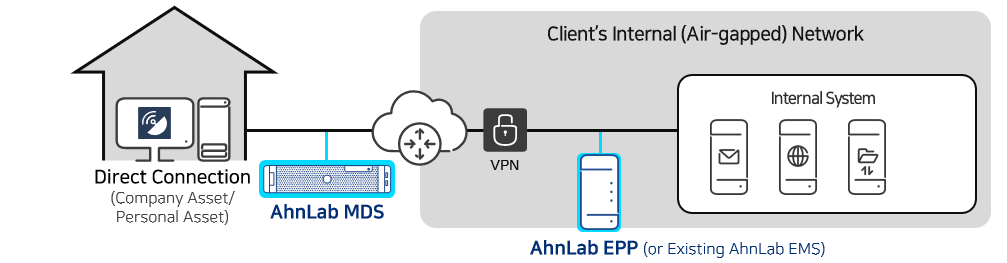
Figure 6. Direct Connection Security Measures
How to Secure Work-From-Home Environment? The Answer Lies in the Platform
AhnLab possesses a wide-ranged security portfolio and offers a platform-based security via integration and synergy of solutions. Each solution does not function individually, but works together to form a synergy and build a unified security process. Even in work-from-home environment, various solutions integrated with AhnLab EPP, AhnLab’s endpoint protection platform, are capable of handling numerous security issues depending on each situations and steps.
The following is an overview of security aspects to consider when working from home, and AhnLab's recommended security measures.
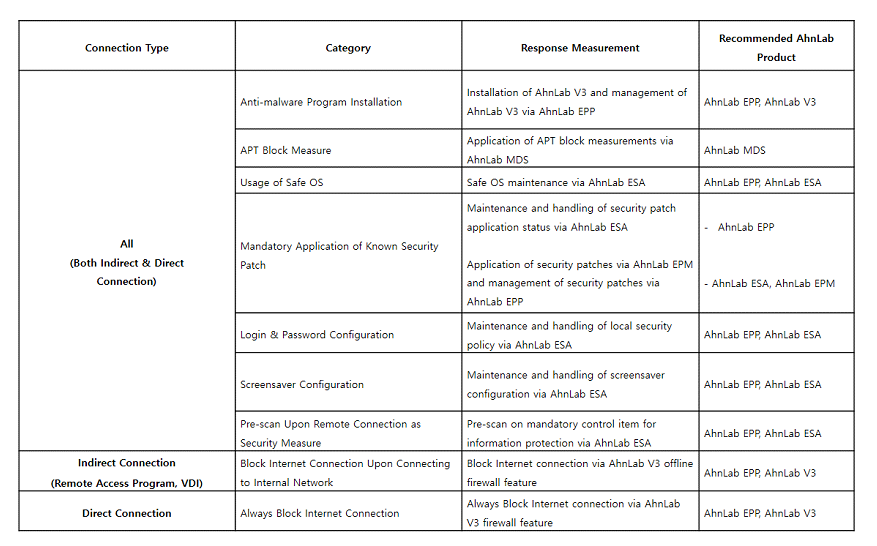
Table. AhnLab’s Recommended Security Measures for WFH Environments
AhnLab predicts that working-from-home will become even more common in all industries. Therefore, business should follow key security guidelines and build security response process to effectively protect business assets.


![[AhnLab ISF 2026] How AI Is Reshaping the Future of Cyber Threats](/_next/image?url=%2Fimage-proxy%3Furl%3Dhttps%253A%252F%252Fcloudimg.ccs.ahnlab.com%252Fimg_upload%252Fcontents_center%252Fimage%252F2610237452519211.png&w=3840&q=75)
![[AhnLab ISF 2026] Opening](/_next/image?url=%2Fimage-proxy%3Furl%3Dhttps%253A%252F%252Fcloudimg.ccs.ahnlab.com%252Fimg_upload%252Fcontents_center%252Fimage%252F2610237450955827.png&w=3840&q=75)