


How to Secure Your Organization as Windows 7 EOS Approaches
Window 7 End of Support (hereinafter referred to as E.O.S.) will take place on January 14, 2020. Surprising as it may seem, the year 2020 is only a month away.

Microsoft has informed users and organizations of Windows 7 E.O.S. with its initial release on October 22nd, 2009, clearly stating that it would only be supported for ten years. However, Microsoft has since extended the final support to January 14th, 2020, which is approximately three months later than the initially announced date. At this point, it is highly unlikely that Microsoft will postpone its due date again.
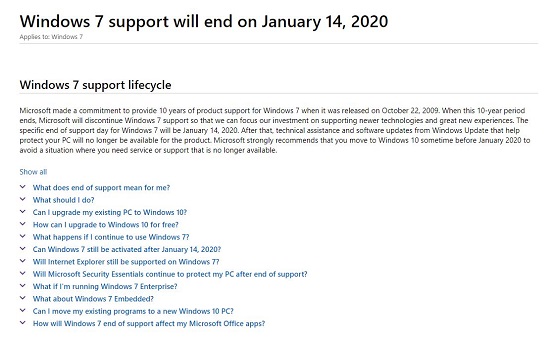
▲ "End of Support for Windows 7" Announcement on Microsoft website
Currently, there are nearly 500 million PCs running on Windows 7 globally. A research conducted by NetMarketShare shows that 35.6% of all the PCs in the world are running on Windows 7.
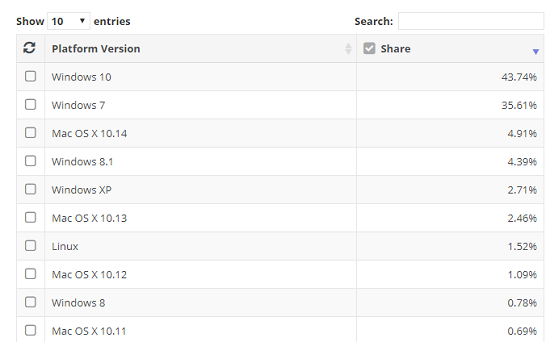
▲ Worldwide market share of OS (*Source: NetMarketShare)
According to StatCounter, a global market research institute, the market share of Windows 7 is exceptionally high among other Windows versions in Southeast Asia, followed by South America and Africa.
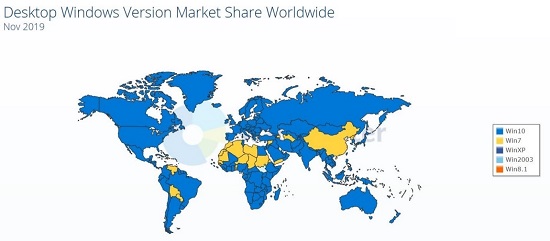
▲ Worldwide market share by the Windows versions (*Source: statcounter.com)
Potential risks of continuously using Windows 7
One of the most frequently asked question for the majority of the people still using Windows 7 is, “Can I continue to use Windows 7 even after the E.O.S.?” The answer is yes; users may continue to use Windows 7. However, this could create critical cybersecurity risks and various restrictions.
If they continue to use Windows 7 after the E.O.S., one of the biggest restriction will be the application compatibility issue. This is because most software manufacturers, including Microsoft, are now developing software products based on Windows 10. Compatibility issues could lead to a more serious problem, security issues. Malware and other security threats love exploiting OS or software vulnerabilities in order to attack. That is why Microsoft regularly distributes security patches for Windows OS and Microsoft Office.
E.O.S. is closely related to security patches. Discontinuing support for Windows 7 means that security patches may not be available, even when a new vulnerability is discovered. And, continuing to use an OS without the latest security patches may result in various cybersecurity threats, such as ransomware and data breach. Experts warn that the damages caused by Windows 7 vulnerability could be more detrimental than that of the WannaCry ransomware attack. Nonetheless, majority of the individuals and companies seem to be unaware of this threat.
To choose or not to choose Windows 7
Individuals and organizations may continue to use Windows 7 even after the official technical support has ended. The choice is ultimately up to each individual and organization. However, upgrading to Windows 10 is most recommended to keep the system safe and secure.
Migrating to macOS or Linux may also be an alternative option. However, these OS aren’t perfectly malware-free and cannot fight security threats on its own. Therefore, it is highly recommended that an anti-virus software be installed to protect each OS adequately. AhnLab’s V3 anti-virus software supports various PC and server OS, including Windows, macOS, and Linux.
Alternatives to upgrading to Windows 10
While cost may be the biggest obstacle for individuals in upgrading to Windows 10, business continuity may be the biggest obstacle for organizations. Organizations that cannot upgrade to the new OS immediately should at least apply all the latest Windows 7 security patches that have been released. Because many malware and cybersecurity attacks exploit vulnerabilities that are already known, applying all the latest security patches can be very helpful in protecting the system against potential threats.
However, checking all the systems in an organization for security updates can be a huge burden for the system administrators because each individual PC might have a different OS version and security patch applied. Utilizing AhnLab Patch Management, security administrators can efficiently manage security patches, allowing easy and efficient management of endpoints, thereby strengthening the endpoint security.
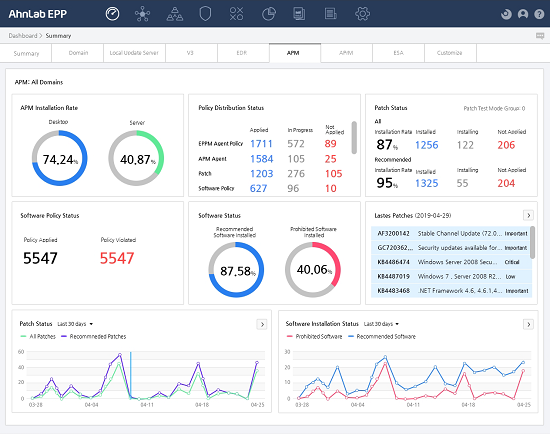
▲ AhnLab Patch Management Dashboard
AhnLab Patch Management allows security administrators to quickly check the current patch status of every PC in their organization and apply patches either automatically or manually. AhnLab Patch Management supports patch application trends for different periods, such as in the last 24 hours, 7 days, and 30 days, and provides troubleshooting guidance to users during the times of error in a security patch update.
AhnLab Patch Management delivers differentiated patch reliability verified by AhnLab’s Patch Lab. AhnLab Patch Management has all the existing security patches for Windows XP and Windows 7, which makes it efficient when managing organizations with various OS environment.
In addition to its well-known patches, AhnLab Patch Management offers a simple operation and efficient management based on an exclusive endpoint protection platform, AhnLab EPP. AhnLab EPP allows simple unified control for all anti-virus and EDR products, along with its security patches. AhnLab Patch Management also identifies systems with prohibited software installed on them. Thus, it provides a comprehensive visibility for system administrators, saving their time and money.


![[AhnLab ISF 2026] How AI Is Reshaping the Future of Cyber Threats](/_next/image?url=%2Fimage-proxy%3Furl%3Dhttps%253A%252F%252Fcloudimg.ccs.ahnlab.com%252Fimg_upload%252Fcontents_center%252Fimage%252F2610237452519211.png&w=3840&q=75)
![[AhnLab ISF 2026] Opening](/_next/image?url=%2Fimage-proxy%3Furl%3Dhttps%253A%252F%252Fcloudimg.ccs.ahnlab.com%252Fimg_upload%252Fcontents_center%252Fimage%252F2610237450955827.png&w=3840&q=75)