


“Zorro” Ransomware Is No Hero
Recently, Zorro, a ransomware that exploits the remote desktop protocol (RDP) of the Windows operating system, is being actively distributed. The damage from the ransomware is expected to rise as the RDP is not only used by individuals but also by companies.
[Figure 1] shows the ransom note of the Zorro ransomware which demands Bitcoins in exchange for decrypting the encrypted files. The name of the ransomware is clearly stated at the top of the note.

[Figure 1] Ransom note of Zorro ransomware
The attacker uses this RDP connection to infiltrate the internal PC that is connected to a specific port as well as the external PC to install the ransomware. Generally, to make an RDP connection, an authentication process is required to connect the systems by entering the addresses of the systems to connect and the password. And just as such, a malicious attacker needs the password of the targeted PC. To obtain the password, the attacker often uses a brute-force attack, which is a repetitive action that tries various combinations of passwords until a correct password is found.
After successfully acquiring the password and being installed on the PC, Zorro ransomware encrypts the files of various extensions and appends the extension .aurora after the existing extensions. This process shows that the Zorro ransomware is a variant of the Aurora ransomware distributed in May through malvertising methods.
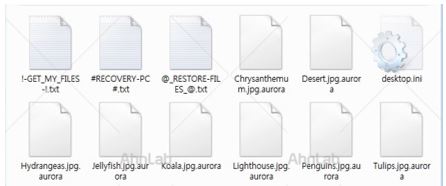
[Figure 2] File extension .aurora appended to encrypted files
Along with the encryption of files, the desktop wallpaper of the PC changes as shown in [Figure 3]. Then text files, marked with the red square in [Figure 3], are generated along with the explanation addressed to the user regarding the encryption. The generated files are ransom notes demanding Bitcoin as shown in [Figure 1].
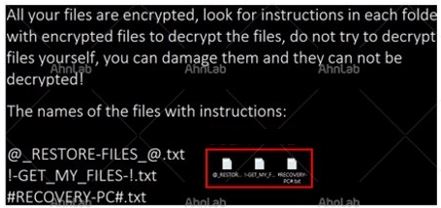
[Figure 3] Changed desktop wallpaper and text files created after the infection
AhnLab’s V3 products detect Zorro Ransomware under the following alias:
<V3 Product Alias>
Malware/Win32.Generic


![[AhnLab ISF 2026] How AI Is Reshaping the Future of Cyber Threats](/_next/image?url=%2Fimage-proxy%3Furl%3Dhttps%253A%252F%252Fcloudimg.ccs.ahnlab.com%252Fimg_upload%252Fcontents_center%252Fimage%252F2610237452519211.png&w=3840&q=75)
![[AhnLab ISF 2026] Opening](/_next/image?url=%2Fimage-proxy%3Furl%3Dhttps%253A%252F%252Fcloudimg.ccs.ahnlab.com%252Fimg_upload%252Fcontents_center%252Fimage%252F2610237450955827.png&w=3840&q=75)