


Three Ways to Defend Against Sophisticated Email Threats
The top points of entry for malware targeting organization and business networks are the web, email, and endpoints. As email has become of great importance in business communication, targeted attacks are increasingly using email as a point of entry. Nowadays, such attacks use sophisticated social engineering techniques and have evolved into spear phishing to target a specific organization or business.
A recent report stated that 91% of targeted attacks for organizations and businesses are initiated with spear phishing emails. It also stated that 94% of spear phishing emails had attachments and 76% of attacks were aimed at government institutions or businesses. In addition, more and more attachments used in the emails are formed as a non-executable or compressed file, not an executable file, in order to bypass detection by security solutions and avoid user suspicion.
As email-borne malware is becoming more sophisticated, it is impossible to prevent attacks by simply being ‘careful.’ The fact is that there is a large amount of ransomware spreading via spam botnets and causing significant damage to organizations and businesses. Though many organizations and businesses are adopting anti-spam solutions, security breaches via email are still occurring. The reason for preventive measures failing is due to rather one-size-fits-all solution for email threats in spite of the diversity of individual business types, sizes, and email infrastructures. There is a need to establish a valid response system to email threats for each entity suitable for its email infrastructure and individual security policy.
This article shows three effective response methods against email-based attacks via AhnLab MDS (hereinafter referred to as “MDS”), an Advanced Persisten Threat (APT) protection solution by AhnLab.
The Three Methods from MDS for Email Threat Response
1. Mail Transfer Agent Mode
MDS provides Mail Transfer Agent (MTA) mode that blocks and quarantines malicious emails in advance. MTA detects malicious emails beforehand, analyzes them, and then blocks and isolates any suspicious emails in the Quarantine within MDS
It is easy to build and operate MDS by simply applying the MTA license. Once the MTA license is applied, MDS performs a virtual machine-based dynamic analysis of emails in the email gateway and anti-spam system to further validate the URLs in the attachment and email body. The emails deemed to be malicious are isolated in quarantine within the MDS device and only safe emails are sent to the mail server.
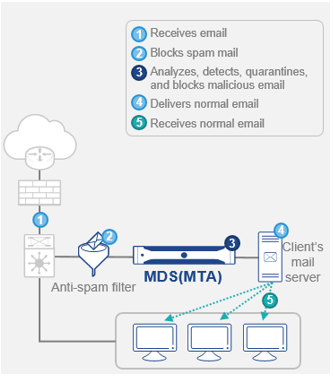
[Figure 1] MTA mode
2. Interoperation with an Anti-Spam System
MDS is highly efficient in a business environment where anti-spam system is deployed and email latency is critical. MDS is highly efficient in a business environment where anti-spam system is deployed and email latency is critical. In this circumstances, MDS functions as an additional analysis system interoperating with anti-spam system. According to the results of its analysis, MDS blocks and responds to APT emails. There is no need to change the existing email infrastructure or email exchange processes in order to build and operate the system. Most of all, it allows for a response to unknown email attacks that are difficult to detect in signature-based anti-spam systems.
Mostly enterprises and central government institutions deploys MDS interoperating with their anti-spam systems to enhance email security. For the case of a ministry in South Korea, operating an email environment where 2.4 million emails are exchanged daily throughout its 300 branches, has interoperated MDS to the existing anti-spam system for stronger filtering. The security manager of the ministry said, "While using MDS, we found more than a dozen malicious emails amongst various emails that were initially determined to be safe.” He also added “We were able to block these emails before they reached the intended recipient.”
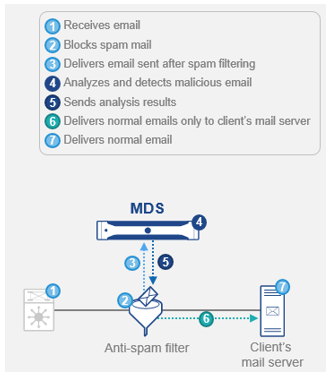
3. Mirroring or BCC Mode
Some companies use cloud-based email services instead of running internal mail servers, or they use webmail (common email accounts) for business email. In such environments, it is often difficult to build an internal email security solution. MDS provides a deployment method of extracting and analyzing the content of attachments and emails by mirroring all the email-related traffic (SMTP/POP3).
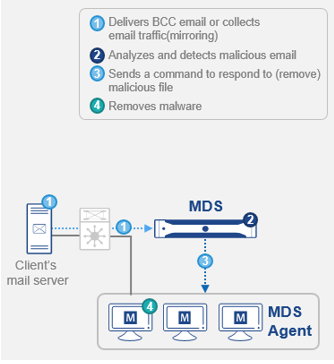
[Figure 3] Mirroring (BCC) method
Also, it is possible to create a blind carbon copy (BCC) account and apply it as default to all recipients of the email, and forward it to the MDS for monitoring. In this case, MDS can analyze the email but it cannot isolate or block mail with malicious content in advance. In order to respond against email threats in this environment, you can use the Execution Holding function through the MDS agent. When a user downloads and executes the file attached to the email, the agent blocks the execution of the file based on the analysis result of the MDS, so that the damage caused by malware can be minimized.
Email Threat Response – Why Is MDS Different?
1. Analysis of Encrypted and Compressed Files
Advanced Persistent Threats (APT) use a variety of techniques to avoid detection by security solutions. In recent years, there has been a rise in email-based advanced attacks that use encrypted compressed files as attachments. There was even a ransomware case last year where an email impersonated an investigation agency and induced users to open the encrypted compressed attachment—pretending to be an invoice for penalty charges—using the password given in the body of the email. As targeted email attacks on organization and businesses are on the rise, especially disguising as a local file compression software, an effective response mechanism is imperative.
MDS uses the password in the email body of such attacks and decompresses the attachment for analysis. If there is no password in the body, a detailed log on the entry of the encrypted compressed file is provided to the security professional so they can respond accordingly.
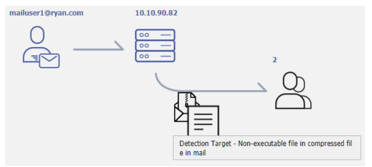
[Figure 4] Flowchart on the attack using the encrypted compressed file
2. Automatic Response against Email Threats
In an environment where thousands of emails are sent and received per day, prompt automated quarantine of malicious emails must be available according to a set of policies. MDS blocks emails containing malicious content in advance before it is delivered to the user, and sends a warning message to the recipient and the security administrator when such email is detected and quarantined. There is also a download feature for the original email message so that the security administrator can make further analysis to avoid any possible false detection errors due to the characteristics of the organization or its business. MDS also provides an automated resend feature for the quarantined email to recipients in order to minimize email delays.
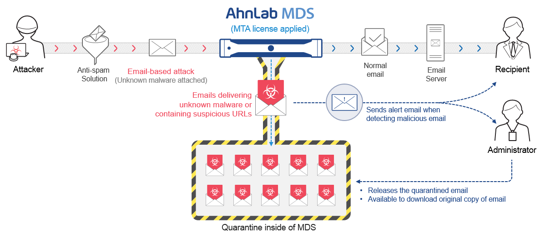
[Figure 5] MDS’s automatic quarantine of email threats
Effective Response Based on Top-Notch Threat Visibility
As the number of sophisticated security threats continues to increase, security managers are struggling with prioritizing the threat response while managing and operating the complex and diverse infrastructure with limited resources. MDS provides an intuitive dashboard to show an overview of malicious emails sent to the organization, total sent and received emails, and blocked emails according to the set security policies. This is how MDS helps security managers effectively manage and respond against threats.
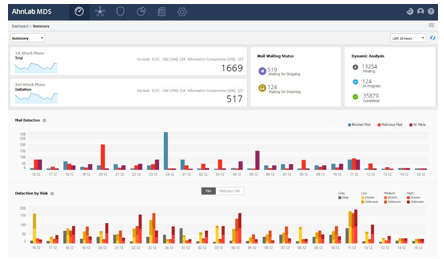
[Figure 6] MDS dashboard for threat visibility


![[AhnLab ISF 2026] How AI Is Reshaping the Future of Cyber Threats](/_next/image?url=%2Fimage-proxy%3Furl%3Dhttps%253A%252F%252Fcloudimg.ccs.ahnlab.com%252Fimg_upload%252Fcontents_center%252Fimage%252F2610237452519211.png&w=3840&q=75)
![[AhnLab ISF 2026] Opening](/_next/image?url=%2Fimage-proxy%3Furl%3Dhttps%253A%252F%252Fcloudimg.ccs.ahnlab.com%252Fimg_upload%252Fcontents_center%252Fimage%252F2610237450955827.png&w=3840&q=75)