


Phishing Emails Disguised as Mail from Apple Has Been Found
Recently, a new type of phishing email targeting Apple users in Korea has been found. Phishing emails disguised as mail from Apple have been reported in the past, and are continuously being reported. Thus, users must be aware of how to distinguish such phishing emails from legitimate ones.
Phishing typically takes place as ads, emails, or even websites of services used by the user so the user mistakes the site for a legitimate site. The goal of phishing is to trick people to give out personal information, such as usernames, passwords, and bank or credit card details, for nefarious purposes.
This particular email impersonating Apple includes a PDF attachment and encourages the reader to open it. It is very similar to past methods.
Once the attachment is opened, it induces the user to access a phishing site by displaying a security issue, as shown in Figure 1. However, this case is more sophisticated than the previous cases by converting the attachment into the language of the target country.
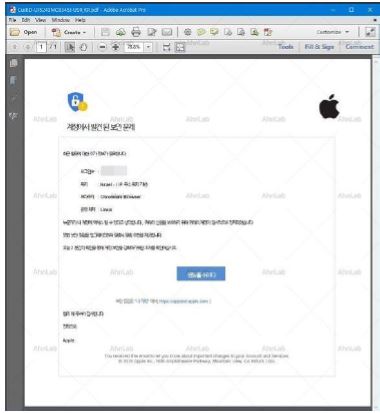
[Figure 1] PDF attachments written in the target country's language
If the user clicks on the 'Take Action' button that appears to be literally translated on the attachment, the user is taken to an Apple ID setting page and is requested to input their card and personal information details. This is the same as the previous method. However, this site is currently blocked as a non-secure website on Google Chrome, as shown in Figure 2.
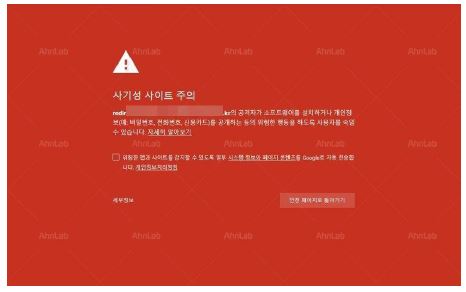
[Figure 2] Phishing site blocked in Chrome
Phishing scams may be an old school method, but it is still being used nowadays for its effectiveness compared to the amount of effort that goes into designing them. As a result, users must be cautious about suspicious emails or files. Also, checking the correct address of the website before entering personal information, as shown in Figure 3, is a helpful method for avoiding damage.
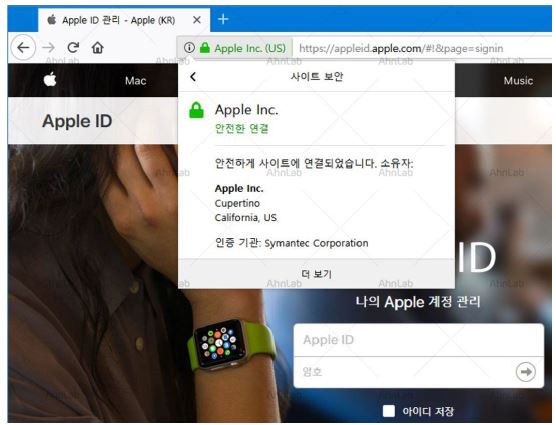
[Figure 3] Checking the site address in the address bar


![[AhnLab ISF 2026] How AI Is Reshaping the Future of Cyber Threats](/_next/image?url=%2Fimage-proxy%3Furl%3Dhttps%253A%252F%252Fcloudimg.ccs.ahnlab.com%252Fimg_upload%252Fcontents_center%252Fimage%252F2610237452519211.png&w=3840&q=75)
![[AhnLab ISF 2026] Opening](/_next/image?url=%2Fimage-proxy%3Furl%3Dhttps%253A%252F%252Fcloudimg.ccs.ahnlab.com%252Fimg_upload%252Fcontents_center%252Fimage%252F2610237450955827.png&w=3840&q=75)