


When Miscreated Ransomware is Way Too Wrong
The ransomware attack encrypting the system files and the folders containing the boot related files has been confirmed recently. When infected with Scarab ransomware, it is unable to boot normally. The attacker, however, is suspected of not intending to encrypt the boot-related files, raising concerns that it may have been a simple mistake or soon lead to a variant.
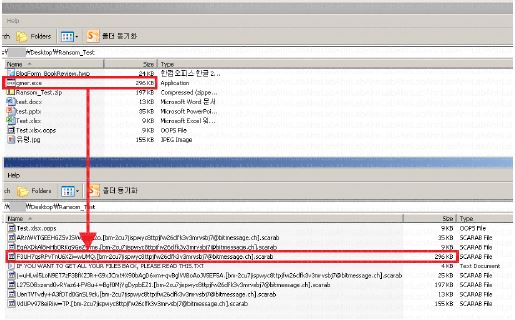
The target of this ransomware
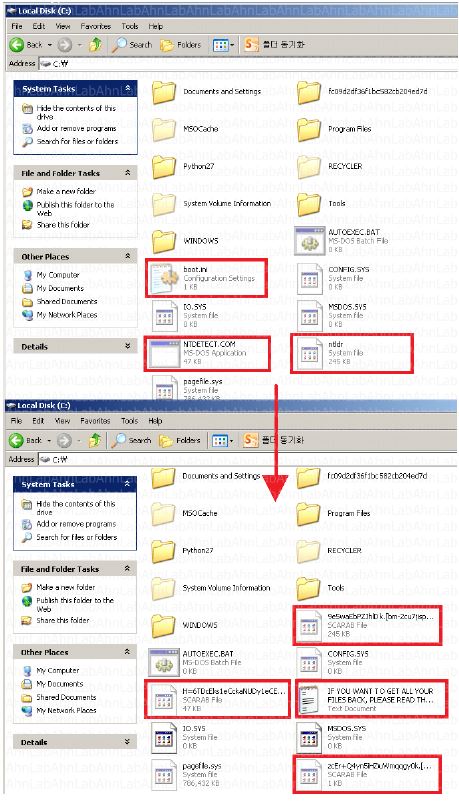
encryption also includes system files. As shown in Figure 2, boot.ini, ntldr,
and NTDETECT.COM, which are files related to the system booting in the root
folder of the C drive of the system, are encrypted. If these files are damaged,
the system will not start normally. Therefore, what the ransomware has done to
register itself in the startup program registry was pointless after
all.
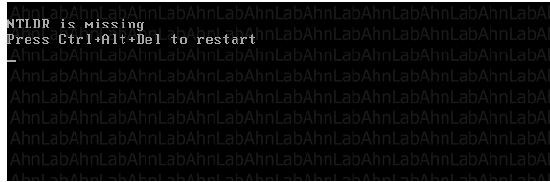
Normally ransomware excludes files containing system files and boot-related files such as Windows, Program Files, Program Files (x86), and ProgramData from encryption list. It is more likely that the user will pay the recovery cost if the system operates normally. However, when encrypted by Scarab ransomware, shutdown.exe commands to shut down the window system while outputting the ransom note. From then, when user restarts their PCs, an error message saying that the boot information can’t be confimed is displayed as shown in Figure 4, and normal booting is not performed.
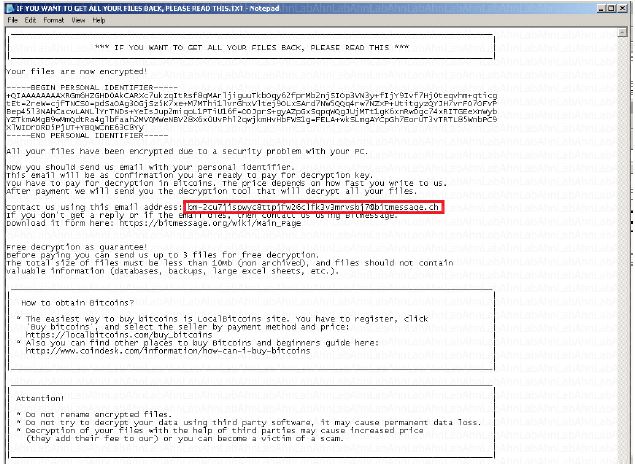
In the
ransom note, as shown in Figure 3, the cost required for file recovery is not
shown but up to 3 files are restored for free. Since the PC does not run
normally anyway, users who have made free recovery cannot use these files.
However, this shows that the attacker didn’t intend to encrypt boot-related
files.
V3, AhnLab’s anti-virus program, detects Scarab.
<Alias
identified by AhnLab V3>
Trojan / Win32.Globeimposter
Whether it is a mistake made by the attacker or not, it is still not possible to use the victim’s PC because the boot is not done normally when it is infected with Scarab ransomware. Eventually, the system needs to be formatted, which can be damaging if you have not done the usual backup. As such, once Ransomware is infected, there is no way to recover it, so it is important to be careful not to be infected on a regular basis and to make backups of important files.
What we can learn from a miscreated ransomware: any variations can affect you in unsuspected way.


![[AhnLab ISF 2026] How AI Is Reshaping the Future of Cyber Threats](/_next/image?url=%2Fimage-proxy%3Furl%3Dhttps%253A%252F%252Fcloudimg.ccs.ahnlab.com%252Fimg_upload%252Fcontents_center%252Fimage%252F2610237452519211.png&w=3840&q=75)
![[AhnLab ISF 2026] Opening](/_next/image?url=%2Fimage-proxy%3Furl%3Dhttps%253A%252F%252Fcloudimg.ccs.ahnlab.com%252Fimg_upload%252Fcontents_center%252Fimage%252F2610237450955827.png&w=3840&q=75)