


Notorious Ransomware Top 6
Ransomware, a type of malware that began appearing several years ago, is becoming increasingly infamous around the world. CryptoLocker, a type of ransomware, has even been written and distributed in multiple languages other than English, raising concerns about the evolution of targeted and localized ransomware.
AhnLab had analyzed and classified characteristics and attack patterns of recent and high-profile ransomware top 6, which distributed between October 2014 and March 2015.
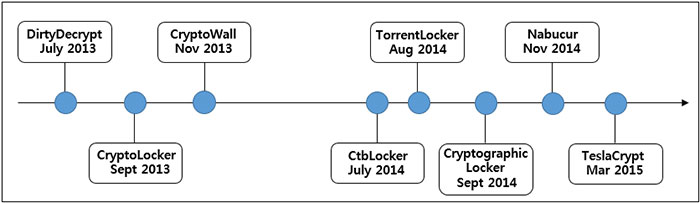
Figure 1. Timeline of major ransomware outbreaks (*Source: AhnLab)
1. NsbLocker / Nabucur
An overview of Nabucur has been previously presented in the February 11th, 2015 AhnLab blog posting (asec.ahnlab.com/1025) under "NSB: National Security Bureau". An infection by this malware places under attack images files (*.bmp, *.gif, *.jpg, *.png), document files (*.doc, *.ppt, *.xls), media files (*.mp3, *.wma) and even executable files (*.exe) and compressed files (*.rar, *.zip). The original files are encoded and backed up, and then transformed into executable files. These original files are not altered using "AES", "RSA" or other similar encryption methods and thus can be restored by a vaccine program.
The altered executables contain not only the backed-up original file but the Nabucur malware code as well, essentially making it another copy of Nabucur malicious code that can further infect other files.
Running a file infected by Nabucur will create two additional executable files in the ‘%User%’ and ‘%ALLUser% subfolders, which then run as threads and attempt to connect to the C&C server and infect files in the system with particular extensions. Finally, a message demanding monetary payment is displayed on the infected system.
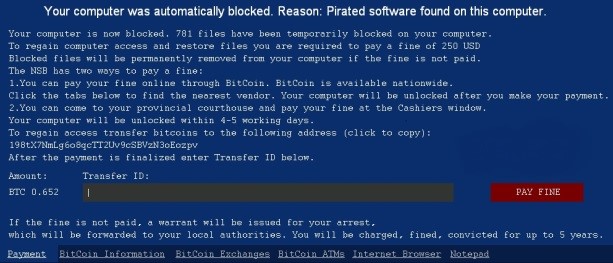
Figure 2. Message that NsbLocker / Nabucur displays (*Source: AhnLab)
2. CTBLocker / Critrioni
First spotted around July 2014, CTBLocker is also known by the name "Critrioni" and is created and executed by a downloader attached to spammed email. The downloader, which rides on the message as an attachment, is compressed as a ".zip" or "cab" file and distributed. The decompressed file has a ".scr" extension. When run, the file creates and opens a normal ".rtf" file in the "%TEMP%" folder, camouflaging itself as a document file yet downloading malicious files in the background with the user's knowledge.
The downloaded file is the malicious ransomware that targets not only Office document files but images, source files and a variety of other file types for encryption; when this process is completed, a message about CTBLocker and a demand for a payment in Bitcoins is displayed on the screen.
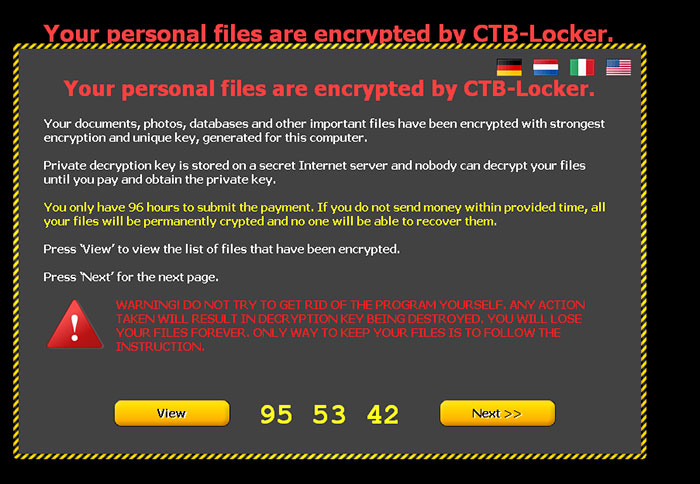
Figure 3. Message that CTBLocker displays (*Source: AhnLab)
3. CryptoLocker
Initially discovered in September 2013, CryptoLocker is distributed as an attachment on a spammed email similar to CTBLocker, or through "Gameover Zeus" P2P botnet malware, to encrypt documents and image files. The malware demands a MoneyPak payment or Bitcoins to restore the files.
This ransomware adds itself to the registry to autorun; note that the registry entry is labeled as "CryptoLocker". The downloader connects to its C&C server and downloads a public key, then encrypts the system's files. The C&C servers are currently offline, preventing the ransomware from functioning.
On August 2014, global security experts launched "Operation Tovar" that brought down the C&C server of the developer of this malware and extracted a number of decryption keys that were stored on the server. Currently a large portion of encrypted files can be restored to their previous states. Approximately 500,000 systems around the world are estimated to have been infected by CryptoLocker leading up to the abovementioned date.
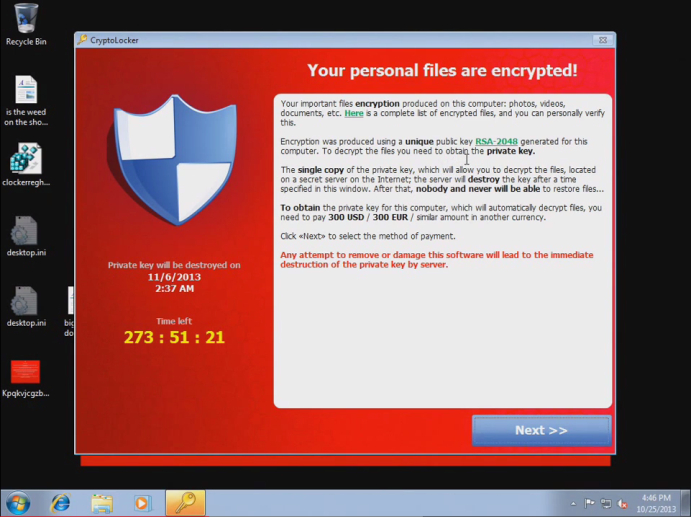
Figure 4. Message that CryptoLocker displays (*Source: AhnLab)
4. CryptoWall / CryptoDefense
CryptoWall's process flow is similar to that of CryptoLocker outlined above. Both work by creating subprocesses and injecting PE images, activating the ransomware component by receiving the public key from the C&C server.
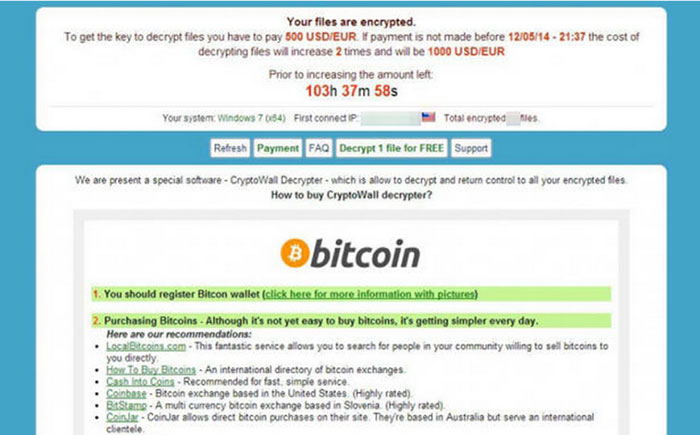
Figure 5. Message that CryptoWall displays
5. TorrentLocker
TorrentLocker also works in a similar fashion as CryptoLocker and CrytoWall examined above, and the code execution process is quite similar as well. The nomenclature "TorrentLocker" comes from the fact that it writes a list of encrypted files to the registry “HKCU\Software\Bit Torrent Application\configuration”.
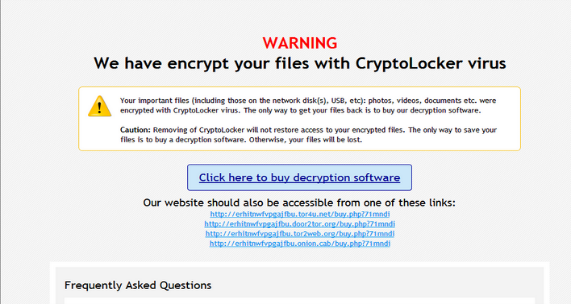
Figure 6. Message that TorrentLocker displays
6. TeslaCrypt
TeslaCrypt is a ransomware variant that attacks game functions and save data, installed onto the PCs of regular users by exploiting weaknesses in flash players that use <div> tags instead of iFrame. The structure itself is similar to CryptoLocker, the difference being that TeslaCrypt attacks not only document files but game-related files (profiles, save files, data, maps, mods, etc.).
Unlike CryptoLocker, TeslaCrypt makes a network connection to transmit the Bitcoin address of the user's PC. A "log.html" file that contains the list of encrypted files and "key.dat" that is used for decoding are stored in the %AppData% folder. A "HELP_RESTORE_FILES.txt" file is created on the desktop containing instructions on making a Bitcoin payment in order to decrypt the affected files.
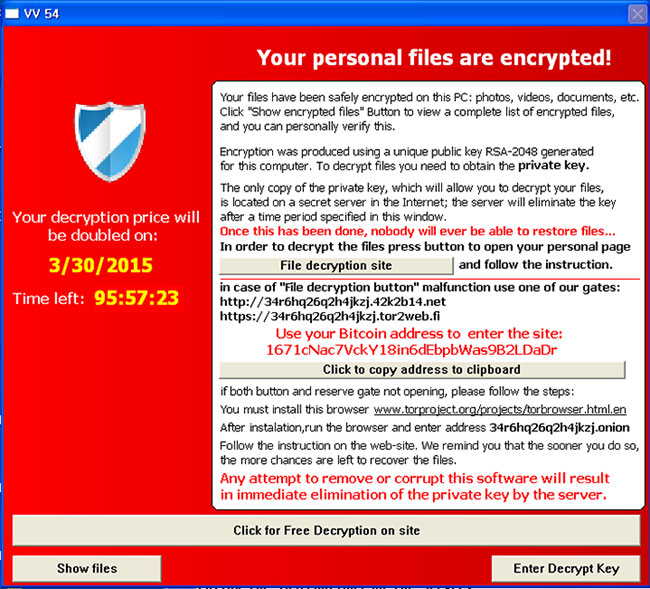
Figure 7. Message that TeslaCrypt displays
Users inevitably panic when their PC becomes disabled by a ransomware infection; if there are important files stored on the system, the user has no other choice but to pay the ransom. The problem is, however, that there is no guarantee that the system will be restored even if the ransom is handed over. Prevention, then, is the best way to protect a system from ransomware.
Suspicious files attached to emails sent from unknown or unfamiliar senders should never be clicked. Keeping a system's virus vaccine up-to-date with the latest release and making sure that the OS and all applications are kept up-to-date are important as well (V3, the anti-virus software of AhnLab, detects these ransomware). We also strongly recommend backing up important files.


![[AhnLab ISF 2026] How AI Is Reshaping the Future of Cyber Threats](/_next/image?url=%2Fimage-proxy%3Furl%3Dhttps%253A%252F%252Fcloudimg.ccs.ahnlab.com%252Fimg_upload%252Fcontents_center%252Fimage%252F2610237452519211.png&w=3840&q=75)
![[AhnLab ISF 2026] Opening](/_next/image?url=%2Fimage-proxy%3Furl%3Dhttps%253A%252F%252Fcloudimg.ccs.ahnlab.com%252Fimg_upload%252Fcontents_center%252Fimage%252F2610237450955827.png&w=3840&q=75)